
.svg)
How to Audit Google Ads Account: The Ultimate Checklist


Most Google Ads audits are a screenshot of a dashboard with a note that says "performance looks stable." That's not an audit. That's a status update.
A real audit is a sequence. You check things in a specific order, because the order changes what you can conclude from what you find. Look at bidding before you look at tracking, and you'll draw the wrong conclusion about why CPA is climbing. Look at Quality Score before you review the account’s change history, and you might spend a week fixing a symptom of a five-minute mistake someone made last month.
This is the checklist we use to work through a Google Ads account, from the first login to a prioritised list of fixes. Nine areas, in the order we actually review them during an audit.
When to Audit a Google Ads Account (and How Often)
An audit isn't a once-a-year formality. There are specific moments where skipping one can get expensive:
- Taking over an account from another agency, freelancer, or in-house team. You inherit every decision made before you.
- Before increasing budget significantly. Scaling spend on top of a broken foundation just makes the losses bigger, faster.
- On a quarterly basis, even if performance looks strong. Over time, accounts change, product feeds require regular updates, and negative keyword lists are often neglected.
- Immediately, if you suspect an unauthorised or undocumented change was made.
That last point deserves more weight than many advertisers give it. In one account we worked on, someone with access made a series of changes without informing the team managing the account. Reverting the settings wasn't enough to fix it. By then, Smart Bidding had already started optimising based on the corrupted signals, and simply undoing the changes couldn't immediately reverse the impact.
Our team applied data exclusions to the affected date range, instructing Smart Bidding to disregard the anomalous performance data rather than use it for future optimisation. Within days, ROAS recovered to 5.61, new customer ROAS nearly doubled to 3.48, and CPA dropped back to $12.28. Spend also increased by 15.6% over the same period, showing the account wasn't just repaired; it was scaling again.
The Google Ads Audit Checklist: 9 Areas to Review
1. Change History and Account Access
Before you look at a single performance number, check who has had access to the account and what they've actually changed. Open the Change History report and filter by the date range that matches any performance shift you're investigating. You're looking for bulk edits, bid strategy switches, budget jumps, paused or removed negative keyword lists, and conversion action changes.
Then check who actually has access. How many users or previous agencies still hold Admin-level permissions? Admin access should be limited to the people actively managing the account day to day; everyone else should be Standard or read-only.
2. Conversion Tracking
Everything else in this checklist depends on this step being right. If conversion tracking is feeding Google inaccurate data, every optimisation decision – from bidding and budgets to account structure – is being made on a false premise.
Start with primary versus secondary conversions. Primary conversions are the actions Smart Bidding actively optimises towards; secondary conversions are for reporting only. For eCom accounts, the primary conversion should almost always be a completed purchase. If Add to Cart or Begin Checkout is set as primary alongside purchases, you're telling the algorithm that a cart add is as valuable as a sale. Next, verify accuracy. Check for duplicate purchase tags, missing conversion values, and conversion actions that were accidentally set as primary.
Finally, test the full journey yourself. Does the search query match the ad copy, and does the ad copy match what's actually on the landing page? Then run a test purchase. Make sure the checkout works, the thank-you page loads, and your purchase conversion fires correctly. Even small website changes, like a broken plugin or a new cookie banner, can break tracking without anyone noticing. Finally, check GA4's Purchase Journey report. If users are dropping off before checkout, the issue is likely your website rather than your campaigns.

3. Campaign Structure
A campaign structure should mirror how the business actually makes money. Start with segmentation. Are high-margin products grouped separately from low-margin ones, or are they sitting in the same ad group fighting for the same bid?
Check the branded versus non-branded split next: if branded search is carrying 70–80% of total spend, prospecting isn't doing real work; it's coasting on demand the brand already generated for free. Then look at overlap between Search, Shopping, and Performance Max: are the same keywords or products being bid on by more than one campaign type, competing against each other in the same auction? Structure your campaigns in a way that gives you clear control over budgets, bidding, targeting, and performance.
4. Budgets and Bidding Strategy
Start with two questions: Are your best-performing campaigns getting enough budget? And is your bidding strategy appropriate for the amount of conversion data available? Check impression share across your top campaigns, specifically Lost IS (Budget) and Lost IS (Rank). If a campaign has a strong ROAS but a high Lost IS (Budget), it's worth testing a higher budget to see if it can profitably generate more revenue. If Lost IS (Rank) is high instead, focus on improving Ad Rank before increasing spend.
Next, compare the campaign's bidding strategy against the amount of conversion data it has available. A strategy that's too advanced for the available data can limit delivery just as much as an insufficient budget.
These are minimums, not guarantees. More complex campaign types or stricter bidding strategies often need significantly more conversion data before Smart Bidding can optimise consistently.
Finally, review recent budget changes. Large increases can push Smart Bidding back into a learning phase, making performance harder to evaluate. As a rule of thumb, increase budgets gradually – around 20% every 3–5 days – so the algorithm can adapt without unnecessary disruption.
5. Search Terms and Negative Keywords
Pull the Search Terms report and look for queries that signal informational intent rather than purchase intent: "how to," "what is," "free," "DIY," "tutorial." These aren't bad clicks in isolation, but if ads are showing for them regularly, you're paying premium CPCs for traffic that was not going to buy.
Check whether shared negative keyword lists are applied consistently across campaigns and whether they're still up to date. It's common to find campaigns using different lists, or no shared list at all, after months of incremental changes. Finally, review the match type mix – heavy reliance on broad match without a strong negative keyword strategy or relevant audience signals is one of the fastest ways to waste budget on irrelevant searches.
6. Ads, Assets and Quality Score
Ad relevance directly affects what you pay per click through Ad Rank. Check message match: does the ad copy reflect the same offer and language as the keyword that triggered it, and does the landing page continue that message once someone clicks? Review asset group creative in Performance Max specifically – outdated or minimal assets (a handful of generic headlines, no video, no lifestyle imagery) limit how well PMax can build compelling ad combinations across placements.
Then break down Quality Score into its three components: Expected CTR, Ad Relevance, and Landing Page Experience. In one account we audited, a set of keywords held a "Below average" Landing Page Experience rating for months because traffic was being sent to a generic product page. After building a dedicated landing page aligned specifically to those keywords, Landing Page Experience moved to "Average," conversion rate on that traffic rose from 8.7% to 12.38%, and CPC dropped on the same keywords – because Quality Score is a direct input into Ad Rank, and a stronger Ad Rank costs less to maintain.
7. Landing Pages
Where Shopping and Search traffic actually lands matters as much as how the campaign is structured to get it there. Check relevance first: does the landing page match the specific product or offer the ad promised, or does it send every visitor onto a generic category page? Then look at the conversion experience itself: how much friction is there between landing on the page and completing the checkout, and does the page load quickly enough on mobile, where most Google Ads traffic now comes from? The goal is to ensure that every click has the best possible chance of becoming a conversion.
8. Merchant Center and Product Feed (eCommerce)
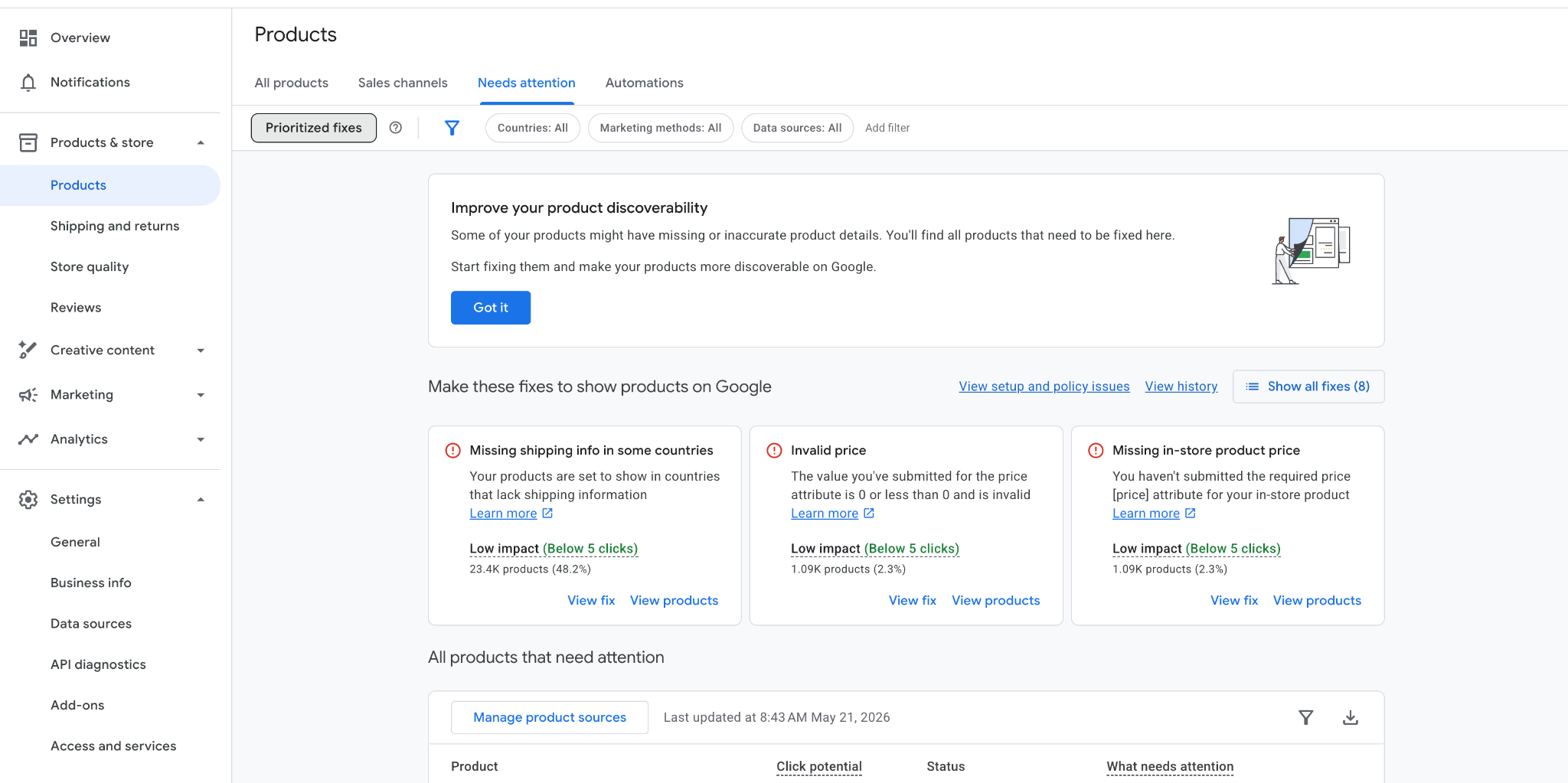
For any eCom account, the feed is the campaign. Structure and bidding can be flawless and still underperform if the underlying product data is weak. Start in Merchant Center Diagnostics and clear any disapprovals or warnings, as these directly limit which products are even eligible to show. Then assess the feed for cleanliness: duplicate Item IDs or GTINs, "junk" products still live in the feed (test SKUs, $0 items, gift cards), and formatting inconsistencies that Google has to guess around. Finally, check titles and attributes: are titles keyword-rich and aligned to actual search demand, is Google Product Category assigned correctly, and do optional attributes like colour, size, and custom labels reflect margin or seasonality where that would help segmentation later?
9. Campaign Settings (Audience Signals, Search Themes & Automation)
Automation isn't the risk. Automation without oversight is. Check whether Smart Bidding targets reflect actual account performance, or whether they were set based on aspirational numbers that were never validated. For Performance Max, review whether relevant audience signals have been added, whether Search Themes are still relevant to the products or services being promoted, and whether the campaign includes appropriate exclusions where applicable (such as brand or URL exclusions). For broad match campaigns, make sure negative keywords and audience signals are in place to keep targeting focused.
Also check how frequently the account is being edited. Constant tweaking during a learning phase resets that learning phase – a cycle that keeps campaigns unstable.
Prioritise Your Audit Findings
A completed checklist isn't the deliverable – a prioritised list of what to fix, and in what order, is. Not every finding carries the same weight, and treating them all as equally urgent is how audits turn into reports nobody acts on.
High-Priority Issues
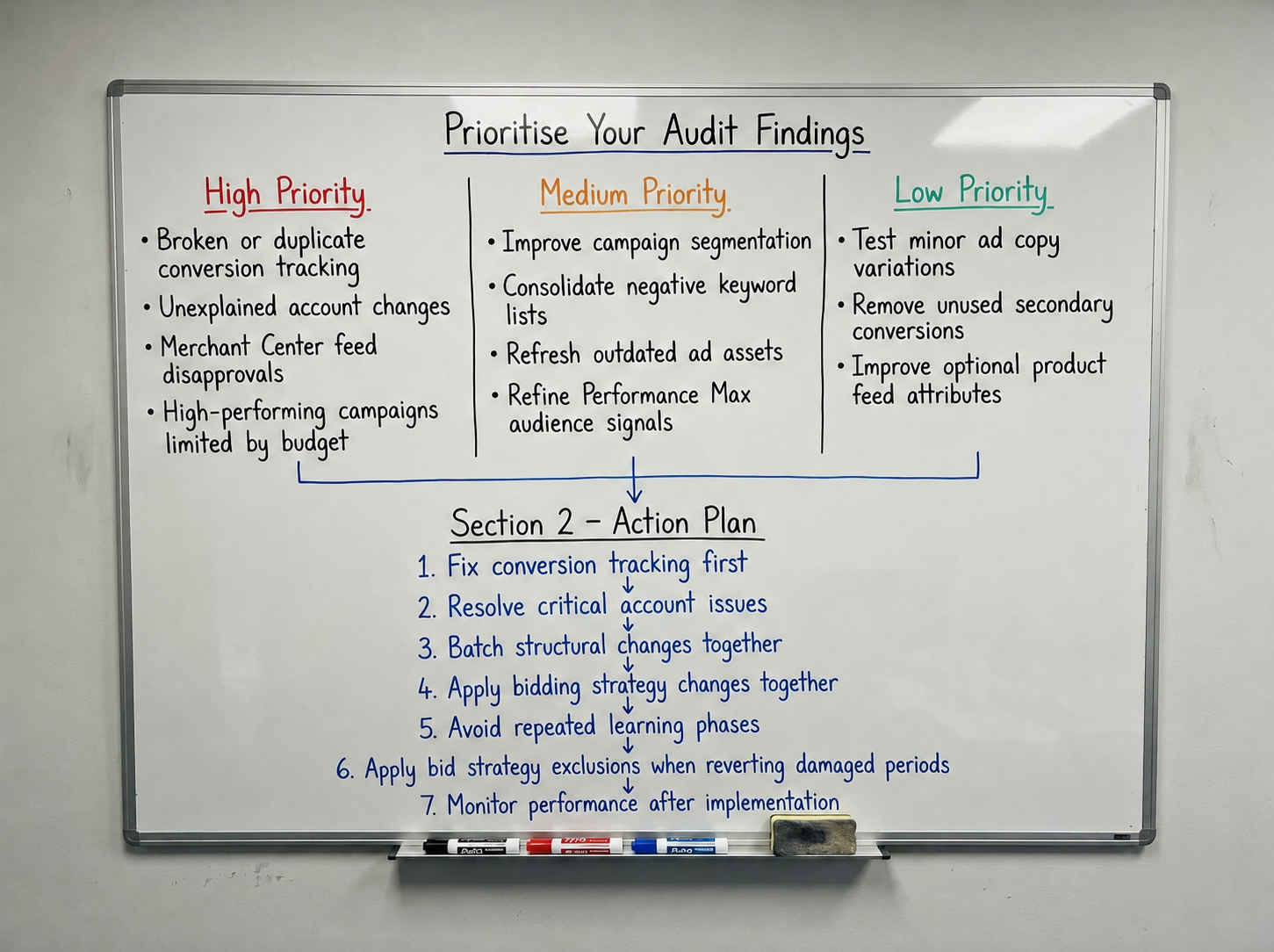
Anything actively corrupting the data other decisions depend on: broken or duplicate conversion tracking, unexplained account changes, feed disapprovals blocking a significant share of the catalogue, or high-converting campaigns being capped by budget. Fix these first, before anything else on the list.
Medium-Priority Improvements
These are improvements that increase account control and efficiency without requiring a complete rebuild. These often include better campaign segmentation by margin or product line, consolidating negative keyword lists, refreshing outdated ad assets, and refining audience signals in Performance Max.
Low-Priority Optimisations
Lastly, look for smaller improvements that are worth making but unlikely to have a major impact on their own: minor ad copy variations, cleaning up unused secondary conversion actions, and enriching optional feed attributes that aren't currently limiting delivery.
Turning Audit Findings Into an Action Plan
Fix tracking first, regardless of what else the audit surfaced. Every other decision on this list gets easier or harder depending on whether the data behind it is trustworthy.
After that, batch structural and bidding changes together instead of spreading them out over several weeks. Every major change to your bid strategy, targets, or budget can trigger a new learning phase. Making changes one by one only restarts that process repeatedly and keeps the campaign in learning for longer than necessary. Make the changes you need, then give the algorithm enough time to adapt before making more.
If you're reverting a change that has already damaged performance, remember that restoring the previous settings won't immediately undo what Smart Bidding has already learned. In those cases, apply data exclusions to the affected date range so the algorithm treats that period as an anomaly rather than continuing to learn from it.
Final Takeaway: A Google Ads Audit Is Only Useful If It Changes Something
A checklist like this one is only as valuable as what happens after you close the tab. It's not a document to file away as proof the account was "reviewed". It's a practical framework for identifying, prioritising, and fixing the issues holding the account back.
Run through it in order. Fix what's actively corrupting your data first. And if you get to the end and nothing on the list needs to change, that's worth being sceptical about too.

Ready To Start Scaling Today?
Scaling Your Favorite eCommerce Brands To The Highest Levels Through Google & YouTube Ads.

.svg)
Get Smarter About How To Scale Your Brand...
Discover Insider Knowledge On How We Scale Brands From 7 Figures All The Way Up To 8-9 Figures With Google Ads.
.svg)
.svg)
"The best Google ads agency there is. You only need to look at the quality of clients and the reviews to understand Jackson and his team are the real deal."

"One of the best in the agency space, great service and exceptional results. Since signing on with Jackson he has become one of our greatest assets when scaling."

"Top tier team & service delivery. Jackson is relentless when it comes to fulfilment & client needs. His attention to detail during the onboarding process ensured exponential results for my coaching business. If you're looking to elevate your ad results & learn a tone of new options/skills that can be implemented to drive more sales to your business then I'd strongly recommend Echelonn."

"From the very first conversation with Jackson and his team, it was clear that we had found a Google Ads agency that prioritises results above all else. Their collaboration between data-driven experts and a skilled copywriter creates a dynamic duo for Google advertising success..."

"Been working with them for 9 months and it's been a great experience. Jackson and his team know what they are doing and always goes above and beyond. If you're looking for a reliable Google ads agency this is the one."

"The best Google ads agency there is. You only need to look at the quality of clients and the reviews to understand Jackson and his team are the real deal."
"One of the best in the agency space, great service and exceptional results. Since signing on with Jackson he has become one of our greatest assets when scaling."
"Top tier team & service delivery. Jackson is relentless when it comes to fulfilment & client needs. His attention to detail during the onboarding process ensured exponential results for my coaching business. If you're looking to elevate your ad results & learn a tone of new options/skills that can be implemented to drive more sales to your business then I'd strongly recommend Echelonn."
"From the very first conversation with Jackson and his team, it was clear that we had found a Google Ads agency that prioritises results above all else. Their collaboration between data-driven experts and a skilled copywriter creates a dynamic duo for Google advertising success..."
"Been working with them for 9 months and it's been a great experience. Jackson and his team know what they are doing and always goes above and beyond. If you're looking for a reliable Google ads agency this is the one."
More Articles Like This.
Find answers to common queries about our services and how we can help you.
.svg)

Google Ads Learning Phase: What It Means and How Long It Lasts

How to Audit Google Ads Account: The Ultimate Checklist
Performance Max Audience Signals Explained
Google Ads Optimization Score: Should You Trust It?
What Is a Good CTR for Google Ads?
Why More Google Ads Spend Doesn't Always Mean More Revenue
How To Rank Your Google Shopping Ads Multiple Times
Why Your Google Ads Scale Breaks After $X Per Day
How to Tell if Your Google Ads Agency Is Underperforming
Why Your Performance Max Campaign Gets Clicks but No Sales
.png)
Why Your Google Ads Budget Isn't Spending (And How to Fix It)

The Right Way to Run Google Dynamic Search Ads
How to Get New Customers With Google Ads in 2026
Why Your Google Ads CPA Keeps Increasing and How to Reduce It
What Is a Good ROAS for eCommerce Businesses?
How to Set Up Google Ads Conversion Tracking the Right Way
How Much Does a Google Ads Agency Cost?
Why Your Google Ads Are Not Converting
.png)
Average CPC in Google Ads by Industry (And What It Means for Your Strategy)
Performance Max vs. Shopping Campaigns: Which One is Better?

Why Your Google Shopping Ads Get Impressions But No Clicks (Image Optimization Guide)
Why Your Google Ads Are Not Showing

YouTube Ads Targeting Framework That's Driven $10M+ for eCommerce Brands

What Professional Google Shopping Ads Management Looks Like
How Much Do Google Ads Cost in 2026?

Should Your Business Use Google Search Ads or Performance Max?

Performance Max Best Practices for Sustainable Growth
.png)
Google Shopping Ads Audience Targeting: What Actually Impacts Performance
.png)
How to Write Google Search Ads That Actually Convert
.png)
6 Google Shopping Feed Best Practices That Drive Better ROAS
%20(1).png)
How to Get Your Products Recommended by AI (ChatGPT, Google AI & More)
.png)
Common Google Ads Myths That Cost Businesses Money
.png)
7 Benefits of Google Shopping Ads for Your eCommerce Business
.png)
How to Switch Google Ads Agency Without Losing Performance or Data
.png)
Demand Capture vs Demand Generation: Where Google Ads Fits
.png)
How to Prepare Your Business for Working With a Google Ads Agency

How to Avoid Wasting Budget on the Wrong Searches With Google Ads Keyword Match Types
Google Ads Account Ownership: What Businesses Should Know Before Hiring an Agency
.png)
Landing Page Optimization Strategies That Increase Conversions
SEO and Google Ads: How Search Engine Optimization and Paid Search Work Together
Types of Remarketing in Google Ads: How Each One Works and When to Use It
Google Ads Keyword Research: How to Find Keywords That Actually Convert
.png)
What Is Google Performance Max and How Does It Work?
.png)
How Advertorials Support High-Intent Google Ads Funnels
%20(Canva%20Template).png)
How Audience Targeting Works in Google Search Ads (and When to Use It)

Google Ads for New Brands: What to Know Before Spending Your First Dollar
.png)
What Is a PPC Agency – and When It Makes Sense to Hire One
.png)
How to Improve Your Google Ads Conversion Rate

.png)
The Right Way to Link Shopify and Google Ads for Scalable Growth
Google Shopping Campaigns Setup Guide 2025
Confessions of a Google Ads Auditor: The Worst Mistakes We See Inside eCom Accounts

How to Spy on Competitor Google Ads: Complete 2025 Guide
%20(2).png)
7 Questions to Ask Before Hiring a Google Ads Consultant
How to Rank #1 on Google Ads: Complete Shopping & Search Guide 2025
.png)
Learning Google Ads in 2025: The Roadmap Nobody Talks About
%20(1).png)
What Makes a Google Ads Specialist Worth $10,000/Month?

Why Cheap Google Ads Consulting Costs You $180,000+ in Lost Revenue
.png)
Why 99% of Google Ads Experts Fail (& How to Find One That Won’t)
.png)
5 Google Product Feed Fixes for eCom Growth
.png)
Google Ads Campaign Structure: Why 95% of Brands Waste Budget on Mixed Traffic

In-House vs Agency Google Ads: Which Delivers Better ROI in 2025?
.png)
How to Scale Google Ads With a Small Budget | Setup and Optimization

Google Shopping Optimization: 11 Proven Tactics for Maximum ROAS
%20(3).png)
eCom Growth Strategy: How We Scaled a Supplement Brand From $1.9M to $8.6M With Google Ads
%20(4).png)
Google Merchant Center Fix: How to Improve Rankings With Accurate Shipping Times

CTR Is Misunderstood by 95% of the PPC Industry (What to Optimise for Instead)
.png)
Google Ads AI | Manual vs Automated Campaign Performance

Complete YouTube Ads Guide 2025 | 3 Formats, 5 Principles, Proven Results
%20(2).png)
eCom Growth Strategy With Google Ads in 2025
.png)
Google Marketing Live 2025: 11 Key Takeaways for Marketers
%20(1).png)
YouTube Advertising Strategy: How to Drive Results Across Every Format
Google Shopping Feed Optimisation: Tips for Better Results

How Long Does it Take for Google Ads to Work?

Search Ad Strategies to Maximize Sales with Google ads for eCommerce (2024)

2025 Google Shopping Ads: Ultimate Guide, Benchmarks, and Pricing Breakdown

Maximizing ROI with Advanced Google Shopping Bid Strategies and Automated Bidding