
.svg)
Why Your Google Ads Budget Isn't Spending (And How to Fix It)


An account can look completely healthy – campaigns enabled, ads approved, no policy warnings – and still leave budget unspent every day. If your Google Ads budget isn't spending, more budget isn't the fix. The real cause is almost always structural: an overly restrictive bid strategy, a feed issue, a tracking gap, or a target that's too ambitious for the amount of data available.
Change the wrong thing, and you'll spend another week collecting data without getting any closer to the real issue. Here's the process we use to diagnose why your Google Ads budget isn’t spending before changing anything.
How to Tell If Your Google Ads Account Has a Spending Problem
A single low-spend day doesn't mean much. Auction competition and search volume move daily spend up and down naturally. What matters is a pattern: if a campaign consistently spends well below its daily budget over a week or two, there might be a spending problem in your Google Ads account.
Why is Google Ads not spending your budget even though everything looks active? Because status labels only confirm a campaign can run, not that it's actually competing for the volume you've funded. Open your Campaigns view and add the Search Lost IS (Budget) or Shopping Lost IS (Budget) columns. A high Lost IS (Budget) suggests your campaign is missing potential impressions because of its budget. If the campaign is profitable and you're looking to scale, increasing the budget may be the right next step. A low number next to a campaign that's still underspending tells you the opposite: budget isn't the constraint, so raising it won't fix anything. The problem is somewhere else – one of the causes below.

Why Is Google Ads Not Spending Your Budget? Common Reasons
Daily Budget Has the Wrong Structure
Shared budgets split across multiple campaigns can starve individual campaigns of their fair share. Portfolio bid strategies can have a similar effect: a shared tROAS, tCPA, or CPC limit across several campaigns caps how aggressively any one of them can bid, which in turn limits how much of its own budget it ever spends.
This is different from simply setting a daily budget too low. A genuinely low budget usually gets spent quickly, then the campaign stops for the day. If your Google Ads budget isn't spending, the budget amount itself often isn't the issue. Before increasing it, check whether the campaign is part of a shared budget or portfolio bid strategy.
Your Bid Strategy Is Too Restrictive (or Still Learning)
Smart Bidding is designed to hit your target, not just spend your budget. If your tCPA is too low or your tROAS is too high for the amount of conversion data available, Google will bid more conservatively rather than enter auctions it's unlikely to win profitably. The result is often an underspending campaign.
This usually happens for one of two reasons: the target was too ambitious from the start, or it no longer reflects the account after a major change. Adjusting your tCPA or tROAS, switching bid strategies, or making significant structural changes can all trigger a new learning phase, during which delivery is naturally less stable. Making further changes before that learning period ends often resets the process again. As a rule of thumb, campaigns with fewer than around 30 conversions in the past month often don't have enough data for a restrictive Target CPA or Target ROAS. In those cases, loosen the target by 10–20%, or switch to Maximise Conversions or Maximise Conversion Value for a couple of weeks to establish a reliable performance baseline before tightening your targets again.
Your Keywords Don't Have Enough Search Volume
Search campaigns can be limited by demand. Very specific long-tail keywords or overly literal exact match targeting often don't have enough search volume to spend a significant daily budget, no matter how high you set it. Google can flag a keyword "Low Search Volume" and pause it from auctions entirely, which is easy to miss because the keyword still appears as enabled in Google Ads.
This is most common with new product launches, tightly niche categories, or small geographic markets, where there simply isn't much search demand. The fix is expanding coverage instead of simply increasing budget: broaden from exact to phrase match, or use Dynamic Search Ads to catch high-intent queries your keyword list might have missed.
Low Ad Rank Is Limiting Delivery
Search Lost IS (Rank) means your campaign isn't losing impressions because of budget; it's losing them because competitors have a stronger Ad Rank. Ad Rank is determined by a combination of your bid, expected CTR, ad relevance, and landing page experience, not just how much you're willing to pay.
Raising bids until you win more auctions works, but it's an expensive fix. A competitor with a more relevant ad and a faster landing page can outrank you while paying less per click, because Google weighs quality signals alongside bid. Check Search Lost IS (Rank) alongside Search Lost IS (Budget) before deciding whether to improve quality or increase budget. If Rank is the bigger number, fix ad copy, keyword-to-ad alignment, and landing page speed first.
Conversion Tracking Is Sending the Wrong Signals
Smart Bidding spends more aggressively when it has enough clean conversion data. Partial, delayed, or inconsistent tracking gives the algorithm less to work with, so it bids and spends more conservatively.
Compare Google Ads conversion counts against Shopify, GA4, or your CRM for the same date range. Small gaps are normal – attribution windows and reporting delays explain those. A large or sudden gap points to a tracking problem, not a budget one.
Merchant Center Issues Are Limiting Shopping Campaigns
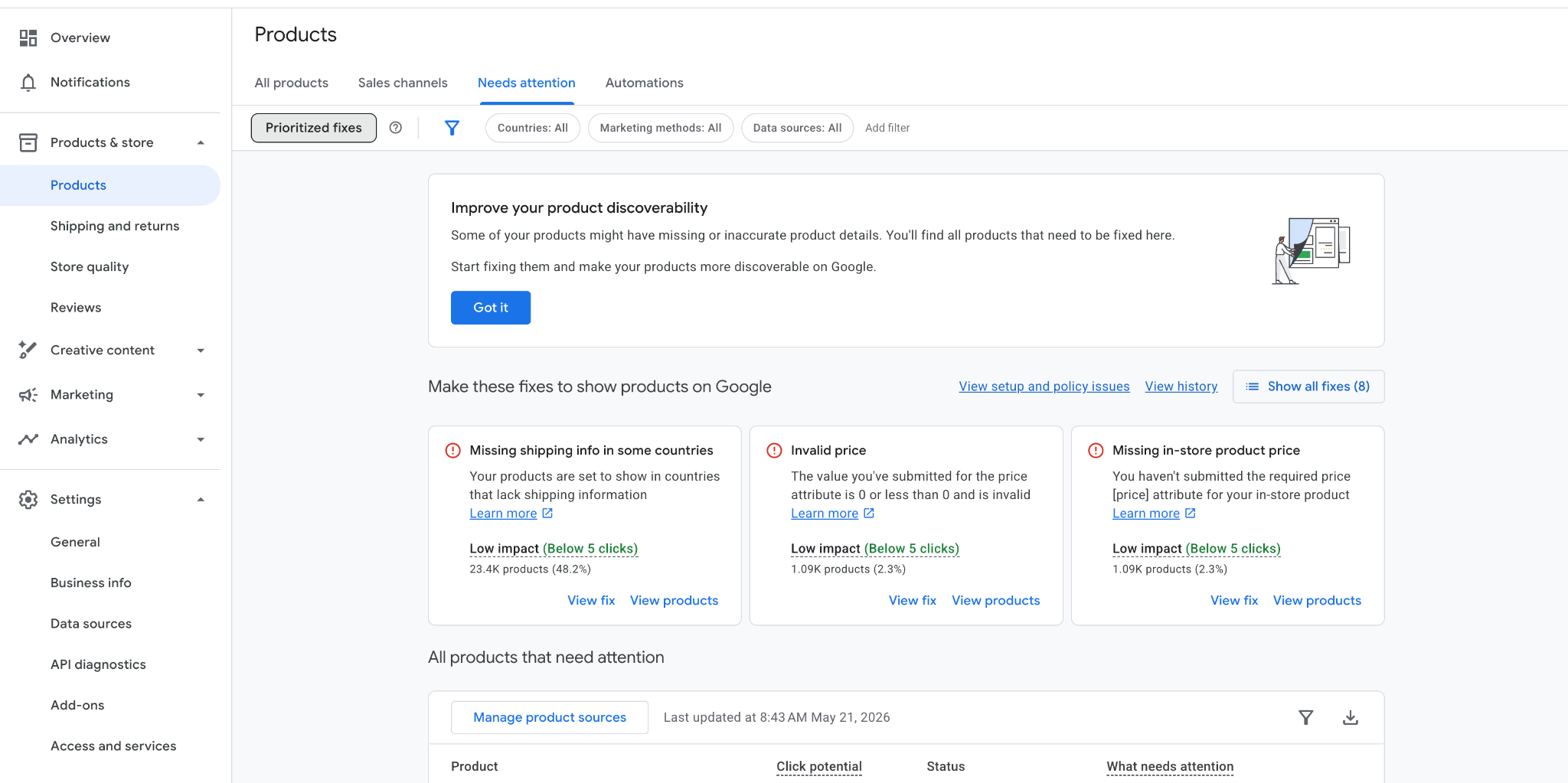
For Shopping and PMax, the issue is often in the Merchant Center, not Google Ads. Disapproved products, policy violations, or feed errors stop products from being eligible to show, even while the campaign status in Google Ads still reads "Active." One check that's easy to miss: in the Merchant Center, uncheck "Prioritised fixes" when reviewing product issues. It's selected by default and hides many of the actual issues. A feed can look clean while still containing dozens of disapproved products hidden by that filter.
We've seen the extreme version directly: a Merchant Center suspension took one account's Shopping fully offline mid-scale. We redirected the budget into channels that were already proven: one Demand Gen campaign went from $8.4K to $70.7K in spend the following month, holding a 1.1x ROAS. A Shopping-specific problem needs a Shopping-specific fix, not an account-wide budget increase.
Your Targeting Is Too Narrow
Individually reasonable settings can combine into a target audience too small to spend against. A very specific location, exact match keywords, and a limited ad schedule can all help improve relevance, but together they may leave too few eligible searches for Google to enter.
Location settings are a common culprit. Review whether your current location targeting matches how customers actually search for your products or services. Then look at the rest of your targeting: match types, audience restrictions, exclusions, and ad schedules. Remove one restriction at a time and monitor how impressions and spend respond, rather than changing multiple settings at once.
A Step-by-Step Process to Diagnose an Underspending Account
Work through these in order rather than jumping to the most likely-looking cause. The reason your Google Ads budget isn't spending may be a combination of several factors.
- Confirm that the campaign is active and that your ads are approved.
- Add the Search/Shopping Lost IS (Budget) and Lost IS (Rank) columns to your campaign view to see what's actually limiting delivery.
- Check the learning status badge – if it's still learning, pause on further changes.
- Compare conversion counts across Google Ads, GA4, and your CRM.
- Run Merchant Center diagnostics with "Prioritised fixes" unchecked.
- Review targeting settings – location, audience exclusions, ad schedule.
- Use the Ad Preview and Diagnosis Tool to check auction eligibility. Never search for your own ads to see if they're showing – it can skew performance signals and doesn't accurately reflect how your ads appear to real users.
How to Fix Google Ads Budget Not Spending
If the issue is your budget, increase it by around 20% every 3–5 days. Large budget increases are more likely to push Smart Bidding back into a learning phase, creating unnecessary instability. As a rule of thumb, Smart Bidding tends to become more stable once a campaign consistently generates around 1–2 conversions per day.
If the issue is your bid strategy, loosen tCPA or tROAS by 10–20% and give it 5–7 days before evaluating the result. As a practical rule of thumb, new or heavily changed campaigns need enough conversion data before automated bidding can perform consistently: around 15–30 conversions per month before testing Maximise Conversions, and 30+ before testing Target CPA or Target ROAS.
If the issue sits outside bidding (tracking, Merchant Center, or targeting), fix that layer first and leave your budget and bid strategy alone. Changing several things at once makes it much harder to identify what actually solved the problem.
When Spending Less Is Actually the Right Outcome
Not every underspend needs fixing. Sometimes, spending less is exactly what protects profitability.
On one subscription eCom account with strong retention, we set prospecting tROAS as low as 0.9x – below what most brands would call safe – because repeat purchases over the following months made customer acquisition profitable, not the first order. Loosening that target further to force full budget spend would have meant buying volume the account's margin couldn't support long-term.
Before trying to "fix" underspending, check whether the target was set conservatively on purpose. If it was, the campaign isn't broken – it's doing exactly what it was designed to do.
Final Takeaway: Understand the Reason First, Then Make Tweaks
The reason your Google Ads budget is not spending is specific and findable in almost every account. Treating it as one problem with one fix is the mistake. A budget increase solves a real budget constraint and does nothing for a tracking issue. A looser bid target fixes a restrictive Smart Bidding strategy and does nothing for a Merchant Center disapproval.
Confirm the pattern, isolate what is limiting delivery, fix that one thing, then wait before touching anything else. It takes a little longer than changing five things at once, but it's the only way to know which change actually solved the problem.

Ready To Start Scaling Today?
Scaling Your Favorite eCommerce Brands To The Highest Levels Through Google & YouTube Ads.

.svg)
Get Smarter About How To Scale Your Brand...
Discover Insider Knowledge On How We Scale Brands From 7 Figures All The Way Up To 8-9 Figures With Google Ads.
.svg)
.svg)
"The best Google ads agency there is. You only need to look at the quality of clients and the reviews to understand Jackson and his team are the real deal."

"One of the best in the agency space, great service and exceptional results. Since signing on with Jackson he has become one of our greatest assets when scaling."

"Top tier team & service delivery. Jackson is relentless when it comes to fulfilment & client needs. His attention to detail during the onboarding process ensured exponential results for my coaching business. If you're looking to elevate your ad results & learn a tone of new options/skills that can be implemented to drive more sales to your business then I'd strongly recommend Echelonn."

"From the very first conversation with Jackson and his team, it was clear that we had found a Google Ads agency that prioritises results above all else. Their collaboration between data-driven experts and a skilled copywriter creates a dynamic duo for Google advertising success..."

"Been working with them for 9 months and it's been a great experience. Jackson and his team know what they are doing and always goes above and beyond. If you're looking for a reliable Google ads agency this is the one."

"The best Google ads agency there is. You only need to look at the quality of clients and the reviews to understand Jackson and his team are the real deal."
"One of the best in the agency space, great service and exceptional results. Since signing on with Jackson he has become one of our greatest assets when scaling."
"Top tier team & service delivery. Jackson is relentless when it comes to fulfilment & client needs. His attention to detail during the onboarding process ensured exponential results for my coaching business. If you're looking to elevate your ad results & learn a tone of new options/skills that can be implemented to drive more sales to your business then I'd strongly recommend Echelonn."
"From the very first conversation with Jackson and his team, it was clear that we had found a Google Ads agency that prioritises results above all else. Their collaboration between data-driven experts and a skilled copywriter creates a dynamic duo for Google advertising success..."
"Been working with them for 9 months and it's been a great experience. Jackson and his team know what they are doing and always goes above and beyond. If you're looking for a reliable Google ads agency this is the one."
More Articles Like This.
Find answers to common queries about our services and how we can help you.
.svg)
Performance Max Audience Signals Explained
Google Ads Optimization Score: Should You Trust It?
What Is a Good CTR for Google Ads?
Why More Google Ads Spend Doesn't Always Mean More Revenue
How To Rank Your Google Shopping Ads Multiple Times
Why Your Google Ads Scale Breaks After $X Per Day
How to Tell if Your Google Ads Agency Is Underperforming
Why Your Performance Max Campaign Gets Clicks but No Sales
.png)
Why Your Google Ads Budget Isn't Spending (And How to Fix It)

The Right Way to Run Google Dynamic Search Ads
How to Get New Customers With Google Ads in 2026
Why Your Google Ads CPA Keeps Increasing and How to Reduce It
What Is a Good ROAS for eCommerce Businesses?
How to Set Up Google Ads Conversion Tracking the Right Way
How Much Does a Google Ads Agency Cost?
Why Your Google Ads Are Not Converting
.png)
Average CPC in Google Ads by Industry (And What It Means for Your Strategy)
Performance Max vs. Shopping Campaigns: Which One is Better?

Why Your Google Shopping Ads Get Impressions But No Clicks (Image Optimization Guide)
Why Your Google Ads Are Not Showing

YouTube Ads Targeting Framework That's Driven $10M+ for eCommerce Brands

What Professional Google Shopping Ads Management Looks Like
How Much Do Google Ads Cost in 2026?

Should Your Business Use Google Search Ads or Performance Max?

Performance Max Best Practices for Sustainable Growth
.png)
Google Shopping Ads Audience Targeting: What Actually Impacts Performance
.png)
How to Write Google Search Ads That Actually Convert
.png)
6 Google Shopping Feed Best Practices That Drive Better ROAS
%20(1).png)
How to Get Your Products Recommended by AI (ChatGPT, Google AI & More)
.png)
Common Google Ads Myths That Cost Businesses Money
.png)
7 Benefits of Google Shopping Ads for Your eCommerce Business
.png)
How to Switch Google Ads Agency Without Losing Performance or Data
.png)
Demand Capture vs Demand Generation: Where Google Ads Fits
.png)
How to Prepare Your Business for Working With a Google Ads Agency

How to Avoid Wasting Budget on the Wrong Searches With Google Ads Keyword Match Types
Google Ads Account Ownership: What Businesses Should Know Before Hiring an Agency
.png)
Landing Page Optimization Strategies That Increase Conversions
SEO and Google Ads: How Search Engine Optimization and Paid Search Work Together
Types of Remarketing in Google Ads: How Each One Works and When to Use It

Google Ads Keyword Research: How to Find Keywords That Actually Convert
.png)
What Is Google Performance Max and How Does It Work?
.png)
How Advertorials Support High-Intent Google Ads Funnels
%20(Canva%20Template).png)
How Audience Targeting Works in Google Search Ads (and When to Use It)

Google Ads for New Brands: What to Know Before Spending Your First Dollar
.png)
What Is a PPC Agency – and When It Makes Sense to Hire One
%20(2).png)
Should You Run Google Ads for Your Website? (Honest Answer)

Confessions of a Google Ads Auditor: The Worst Mistakes We See Inside eCom Accounts
%20(2).png)
7 Questions to Ask Before Hiring a Google Ads Consultant
%20(1).png)
What Makes a Google Ads Specialist Worth $10,000/Month?

Why Cheap Google Ads Consulting Costs You $180,000+ in Lost Revenue
.png)
Why 99% of Google Ads Experts Fail (& How to Find One That Won’t)

In-House vs Agency Google Ads: Which Delivers Better ROI in 2025?
.png)
How to Scale Google Ads With a Small Budget | Setup and Optimization
%20(3).png)
eCom Growth Strategy: How We Scaled a Supplement Brand From $1.9M to $8.6M With Google Ads
%20(4).png)
Google Merchant Center Fix: How to Improve Rankings With Accurate Shipping Times

CTR Is Misunderstood by 95% of the PPC Industry (What to Optimise for Instead)
%20(2).png)
eCom Growth Strategy With Google Ads in 2025
%20(1).png)
YouTube Advertising Strategy: How to Drive Results Across Every Format

How Long Does it Take for Google Ads to Work?

YouTube Ads Cost in 2025: How to Launch & Optimize a YouTube Advertising Campaign