
.svg)
Why Your Performance Max Campaign Gets Clicks but No Sales


A Performance Max campaign can look healthy while generating very little revenue. You might see plenty of clicks, a good CTR, and steady spend, yet almost no purchases. The problem could be as simple as a broken purchase signal, or as subtle as PMax spending budget on low-quality inventory that generates clicks but little or no revenue. It could also sit in the product feed, the traffic PMax is finding, or the landing page users reach after the click.
That's what makes PMax no-sale problems tricky to diagnose. You can see the outcome, but not always the full path that produced it. Before you pause the campaign or start changing bids, work through the account systematically and find out where the conversion path is actually breaking.
Why Performance Max Makes No-Sale Problems Harder To Diagnose
Performance Max earned its black-box reputation for a reason. Early versions gave advertisers little visibility beyond spend and conversions, with no channel split, search term data, or meaningful asset-level reporting. That has changed. Google now provides Channel Performance reporting across Search, Shopping, Display, YouTube, Discover, Gmail, and Maps, alongside Search Terms and asset-level performance data.
But PMax still gives you less visibility than a traditional Search or Shopping campaign. You can see which channel generated a conversion and which search terms triggered your ads, but you don't always get the full path from impression to purchase. Asset ratings can show which creative is contributing, but they don't explain why it works. That makes diagnosis harder when clicks are coming in but sales aren't.
And that's why CTR is a weak diagnostic metric on its own. A healthy CTR tells you people are willing to click. It doesn't tell you whether your purchase tracking is correct, whether brand traffic is inflating performance, whether your feed matches search intent, or whether the landing page can convert the traffic. The useful question isn't whether PMax is getting clicks. It's where the conversion path is breaking.
How to Diagnose Why Your Performance Max Campaign Gets Clicks but No Sales
Check Your Conversion Tracking And Goals First
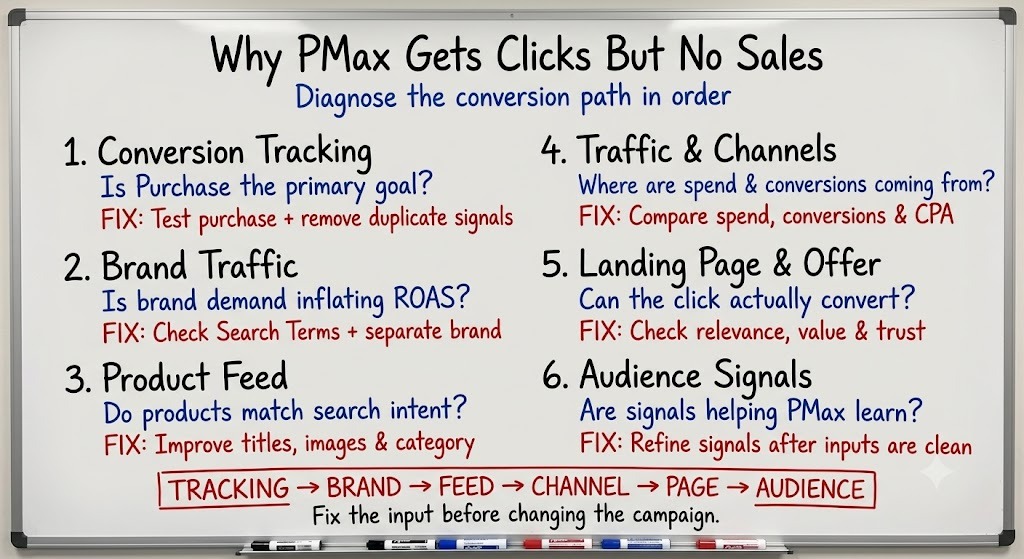
PMax relies heavily on Smart Bidding, so the conversion signal you give it matters more than most campaign settings. Start in Google Ads under Goals and confirm that Purchase is your primary conversion action, with an accurate conversion value. Add to Cart and Begin Checkout can still be tracked, but should normally sit as Secondary if you don't want PMax optimising towards them. Then run a test purchase and verify that the purchase conversion fires only after a completed transaction, not when the checkout or confirmation page simply loads.
Also check for duplicate purchase conversions. If two tags fire for the same order, Google Ads can overstate conversions and revenue, giving PMax a distorted signal to optimise against. Compare Google Ads purchase data with your GA4 or eCommerce platform data – if the numbers don't match, fix the tracking before changing bids, budgets, or campaign structure.
Find Out Whether Brand Traffic Is Inflating Performance
This isn't usually the reason a PMax campaign gets clicks but no sales. Instead, brand traffic can make a campaign look healthier than its prospecting performance really is. If your PMax campaign mixes brand and prospecting traffic, strong brand demand can inflate blended ROAS while giving you less visibility into how effectively the campaign is acquiring new customers. PMax optimises towards the conversion goals you give it, so a campaign capturing high-intent brand searches alongside colder traffic can appear highly efficient even when prospecting performance is much weaker.
Start with the PMax Search Terms report and look at how much conversion volume is coming from your own brand name and close variants. We've seen mixed brand and prospecting PMax campaigns average as high as 10.5 ROAS while still hiding weaker prospecting performance underneath. If brand traffic accounts for a meaningful share of conversions, consider separating brand and prospecting so each can be evaluated against a clearer objective.
Audit The Product Feed Behind Your Clicks
In eCom accounts, Shopping can account for a significant share of PMax spend and conversions, making the product feed one of the campaign's biggest performance levers. Weak titles, thin descriptions, missing attributes, or generic product imagery can attract the wrong clicks or fail to give shoppers enough information to buy. On one account we’ve managed, new PMax campaigns built around an optimised feed generated more than 60% of total PMax revenue.
To audit your own feed, start with your highest-spend products and check three things: does the title include the non-branded terms buyers actually search for, rather than just the internal product name; do the images represent the product accurately and work well in the context of the Shopping listing, particularly on mobile; and is the google_product_category specific enough to accurately describe the product rather than relying on a broad or inaccurate classification? If the feed isn't helping Google understand the product or helping shoppers choose it, more clicks won't solve the problem.
Look At Where PMax Is Finding Traffic
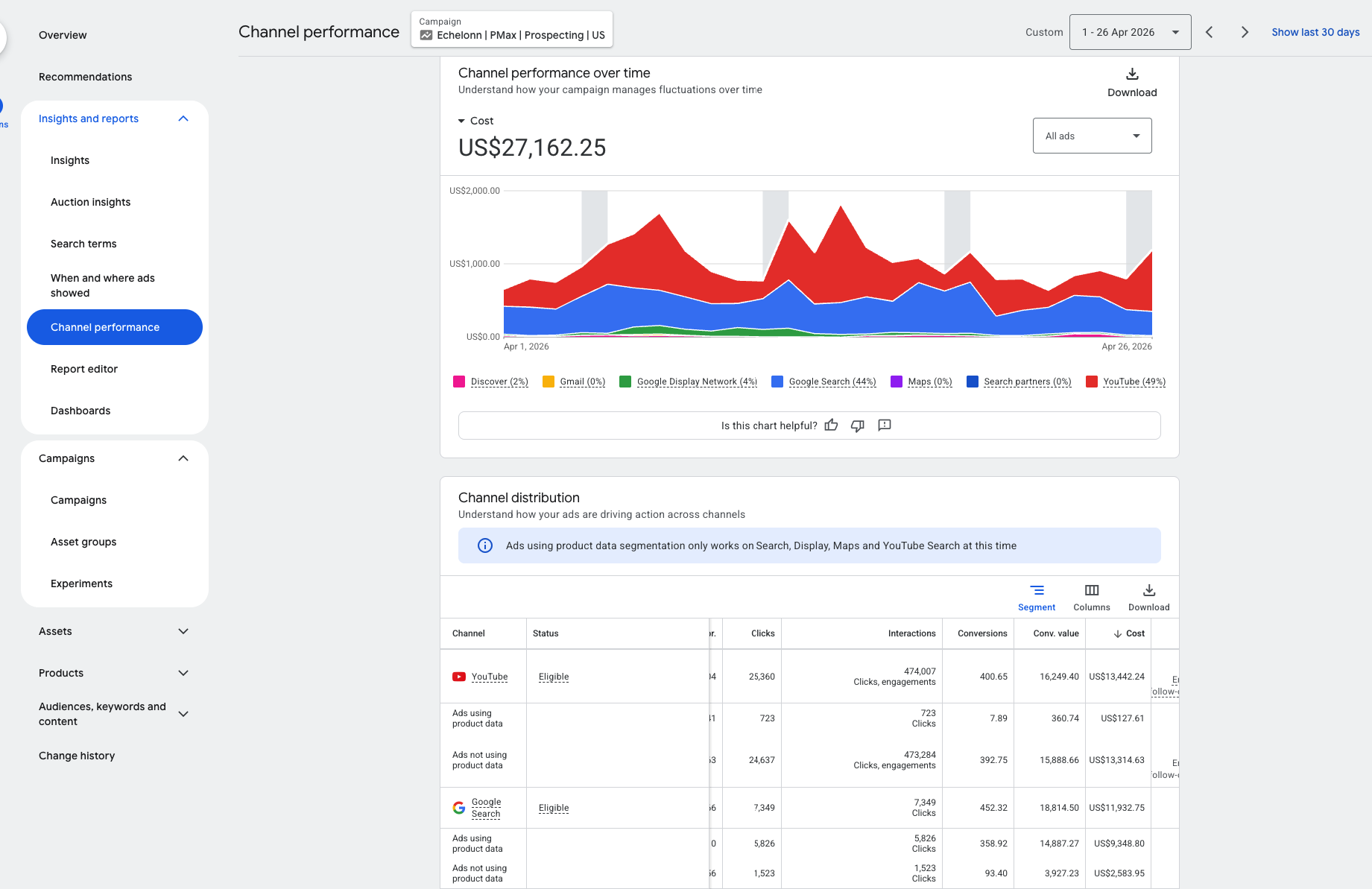
PMax can serve across Search, Shopping, Display, YouTube, Gmail, Discover, and Maps, so check where spend and conversions are actually coming from before changing the campaign. The Channel Performance report gives you a useful first view of that mix.
The practical check is simple: compare spend, conversions, and cost per conversion across the available channels. If one is taking meaningful spend with little or no conversion value, investigate the underlying traffic and placements before making changes. A weak channel-level result doesn't automatically mean the entire channel is the problem; the issue may be specific inventory within it.
Check Whether The Landing Page And Offer Can Convert The Traffic
If tracking is accurate, brand contamination is ruled out, and the feed and channel mix look healthy, check what happens after the click. One test comparing standard product pages with collection-led landing pages found the collection-led version delivered roughly two to three times higher conversion rates, with the same products, pricing, and offer. The landing experience was the main variable.
That doesn't mean every PMax click needs a collection page. It does show that the landing page can have a major impact on conversion rate. Check whether it matches how people in your category actually shop, and whether the value proposition is clear within the first few seconds. Then pressure-test the offer itself: is the pricing competitive, is there a clear reason to buy now, and are trust signals strong enough to remove hesitation?
Use Audience Signals To Give PMax Better Starting Information
Audience signals are one of the most misunderstood settings in PMax. They're not targeting; they're additional information Google can use to help guide its initial learning, and PMax can still serve beyond those audiences. Treating them as a hard boundary is a mistake, but so is assuming they will fix a campaign with weak conversion data or poor traffic quality.
For some high-value or competitive product segments, it can also be useful to test different asset group approaches. One account used separate feed-only, full-build, and conquesting asset groups, with competitor keywords and URLs used as audience signals in the latter. That's a specific structure rather than a universal PMax rule, but it can be useful when you want to test different approaches to Shopping coverage, creative, and prospecting within the same campaign. Audience signals won't fix a campaign with broken tracking or brand contamination. They refine a campaign that's already working with clean data.
The Bottom Line: PMax Needs The Right Signals To Find The Right Sales
Performance Max isn't random. It optimises exactly toward what you tell it matters, using exactly the data you give it, across exactly the inventory you don't restrict. When it gets clicks but no sales, blaming "the algorithm" is rarely the most useful diagnosis. It's somewhere further upstream: a tracking setup feeding it the wrong signal, a blended campaign letting brand demand carry the average, a feed that doesn't match what buyers are actually searching for, budget landing in inventory that was never going to convert, or a landing page that can't close what the click already earned.
Work through the diagnosis in order, tracking first, then segmentation, then feed, then placement, then the page itself, and audience signals last, once everything feeding the algorithm is actually clean. Fix the input, and PMax generally does what it's designed to do. It just needs the right information to do it with.

Ready To Start Scaling Today?
Scaling Your Favorite eCommerce Brands To The Highest Levels Through Google & YouTube Ads.

.svg)
Get Smarter About How To Scale Your Brand...
Discover Insider Knowledge On How We Scale Brands From 7 Figures All The Way Up To 8-9 Figures With Google Ads.
.svg)
.svg)
"The best Google ads agency there is. You only need to look at the quality of clients and the reviews to understand Jackson and his team are the real deal."

"One of the best in the agency space, great service and exceptional results. Since signing on with Jackson he has become one of our greatest assets when scaling."

"Top tier team & service delivery. Jackson is relentless when it comes to fulfilment & client needs. His attention to detail during the onboarding process ensured exponential results for my coaching business. If you're looking to elevate your ad results & learn a tone of new options/skills that can be implemented to drive more sales to your business then I'd strongly recommend Echelonn."

"From the very first conversation with Jackson and his team, it was clear that we had found a Google Ads agency that prioritises results above all else. Their collaboration between data-driven experts and a skilled copywriter creates a dynamic duo for Google advertising success..."

"Been working with them for 9 months and it's been a great experience. Jackson and his team know what they are doing and always goes above and beyond. If you're looking for a reliable Google ads agency this is the one."

"The best Google ads agency there is. You only need to look at the quality of clients and the reviews to understand Jackson and his team are the real deal."
"One of the best in the agency space, great service and exceptional results. Since signing on with Jackson he has become one of our greatest assets when scaling."
"Top tier team & service delivery. Jackson is relentless when it comes to fulfilment & client needs. His attention to detail during the onboarding process ensured exponential results for my coaching business. If you're looking to elevate your ad results & learn a tone of new options/skills that can be implemented to drive more sales to your business then I'd strongly recommend Echelonn."
"From the very first conversation with Jackson and his team, it was clear that we had found a Google Ads agency that prioritises results above all else. Their collaboration between data-driven experts and a skilled copywriter creates a dynamic duo for Google advertising success..."
"Been working with them for 9 months and it's been a great experience. Jackson and his team know what they are doing and always goes above and beyond. If you're looking for a reliable Google ads agency this is the one."
More Articles Like This.
Find answers to common queries about our services and how we can help you.
.svg)
What Is a Good CTR for Google Ads?
Why More Google Ads Spend Doesn't Always Mean More Revenue
How To Rank Your Google Shopping Ads Multiple Times
Why Your Google Ads Scale Breaks After $X Per Day
How to Tell if Your Google Ads Agency Is Underperforming
Why Your Performance Max Campaign Gets Clicks but No Sales
.png)
Why Your Google Ads Budget Isn't Spending (And How to Fix It)

The Right Way to Run Google Dynamic Search Ads
How to Get New Customers With Google Ads in 2026
Why Your Google Ads CPA Keeps Increasing and How to Reduce It
What Is a Good ROAS for eCommerce Businesses?
How to Set Up Google Ads Conversion Tracking the Right Way
How Much Does a Google Ads Agency Cost?
Why Your Google Ads Are Not Converting
.png)
Average CPC in Google Ads by Industry (And What It Means for Your Strategy)
Performance Max vs. Shopping Campaigns: Which One is Better?

Why Your Google Shopping Ads Get Impressions But No Clicks (Image Optimization Guide)
Why Your Google Ads Are Not Showing

YouTube Ads Targeting Framework That's Driven $10M+ for eCommerce Brands

What Professional Google Shopping Ads Management Looks Like
How Much Do Google Ads Cost in 2026?

Should Your Business Use Google Search Ads or Performance Max?

Performance Max Best Practices for Sustainable Growth
.png)
Google Shopping Ads Audience Targeting: What Actually Impacts Performance
.png)
How to Write Google Search Ads That Actually Convert
.png)
6 Google Shopping Feed Best Practices That Drive Better ROAS
%20(1).png)
How to Get Your Products Recommended by AI (ChatGPT, Google AI & More)
.png)
Common Google Ads Myths That Cost Businesses Money
.png)
7 Benefits of Google Shopping Ads for Your eCommerce Business
.png)
How to Switch Google Ads Agency Without Losing Performance or Data
.png)
Demand Capture vs Demand Generation: Where Google Ads Fits
.png)
How to Prepare Your Business for Working With a Google Ads Agency

How to Avoid Wasting Budget on the Wrong Searches With Google Ads Keyword Match Types
Google Ads Account Ownership: What Businesses Should Know Before Hiring an Agency
.png)
Landing Page Optimization Strategies That Increase Conversions
SEO and Google Ads: How Search Engine Optimization and Paid Search Work Together
Types of Remarketing in Google Ads: How Each One Works and When to Use It
Google Ads Keyword Research: How to Find Keywords That Actually Convert
.png)
What Is Google Performance Max and How Does It Work?
.png)
How Advertorials Support High-Intent Google Ads Funnels
%20(Canva%20Template).png)
How Audience Targeting Works in Google Search Ads (and When to Use It)

Google Ads for New Brands: What to Know Before Spending Your First Dollar
.png)
What Is a PPC Agency – and When It Makes Sense to Hire One
.png)
How to Improve Your Google Ads Conversion Rate

.png)
The Right Way to Link Shopify and Google Ads for Scalable Growth
Google Shopping Campaigns Setup Guide 2025
Confessions of a Google Ads Auditor: The Worst Mistakes We See Inside eCom Accounts
How to Spy on Competitor Google Ads: Complete 2025 Guide
%20(2).png)
7 Questions to Ask Before Hiring a Google Ads Consultant
How to Rank #1 on Google Ads: Complete Shopping & Search Guide 2025
.png)
Learning Google Ads in 2025: The Roadmap Nobody Talks About
%20(1).png)
What Makes a Google Ads Specialist Worth $10,000/Month?

Why Cheap Google Ads Consulting Costs You $180,000+ in Lost Revenue
.png)
Why 99% of Google Ads Experts Fail (& How to Find One That Won’t)
.png)
5 Google Product Feed Fixes for eCom Growth
.png)
Google Ads Campaign Structure: Why 95% of Brands Waste Budget on Mixed Traffic

In-House vs Agency Google Ads: Which Delivers Better ROI in 2025?
.png)
How to Scale Google Ads With a Small Budget | Setup and Optimization

Google Shopping Optimization: 11 Proven Tactics for Maximum ROAS
%20(3).png)
eCom Growth Strategy: How We Scaled a Supplement Brand From $1.9M to $8.6M With Google Ads
%20(4).png)
Google Merchant Center Fix: How to Improve Rankings With Accurate Shipping Times

CTR Is Misunderstood by 95% of the PPC Industry (What to Optimise for Instead)
.png)
Google Ads AI | Manual vs Automated Campaign Performance

Complete YouTube Ads Guide 2025 | 3 Formats, 5 Principles, Proven Results
%20(2).png)
eCom Growth Strategy With Google Ads in 2025
.png)
Google Marketing Live 2025: 11 Key Takeaways for Marketers
%20(1).png)
YouTube Advertising Strategy: How to Drive Results Across Every Format
Google Shopping Feed Optimisation: Tips for Better Results

How Long Does it Take for Google Ads to Work?

Search Ad Strategies to Maximize Sales with Google ads for eCommerce (2024)

2025 Google Shopping Ads: Ultimate Guide, Benchmarks, and Pricing Breakdown

Maximizing ROI with Advanced Google Shopping Bid Strategies and Automated Bidding