
.svg)
How To Rank Your Google Shopping Ads Multiple Times


Most brands running Google Shopping have one product listing per product. That listing is trying to rank for every relevant search in its category – and that's not how Google Shopping actually works.
Take magnesium supplements. Someone searching “magnesium for sleep” is probably dealing with insomnia. Someone searching “magnesium for anxiety” is managing stress. “Magnesium for kids” is a parent looking for a child-safe supplement. “Magnesium for muscle cramps” is likely an athlete. The same product, but completely different intent behind each search – different buying triggers, different personas, different messaging that would convert them.
Many brands try to solve this problem by optimising for the most generic search they can find: “magnesium supplement”. They rank for that, and effectively opt out of every other intent-specific query. The fix is product duplication: a strategy that lets one product show up across multiple positions in the Shopping carousel, each listing optimised for a different search intent. Here's exactly how it works.
Prefer to watch instead of read? Watch the full video below:
Why One Product Listing Is Capping Your Shopping Performance
When someone searches on Google Shopping, Google scans your product feed for relevance signals before deciding whether to enter your product into the auction. Products with closer keyword matches to the search query get prioritised. Products with weaker matches get deprioritised or skipped entirely.
If your single listing uses a generic title like “premium magnesium supplement”, Google sees a partial match when someone searches “magnesium for anxiety”. It may still show your product, but the relevance is weaker than a competitor who built a listing specifically around that query, and that gap tends to show up in both impression share and click-through rate.
The intent-specific queries also tend to have lower competition. Fewer advertisers are bidding on “magnesium for muscle recovery” than on “magnesium supplement”. That means lower CPCs, higher purchase intent (the person knows exactly what they want), and a better message-to-market match that directly improves conversion rate. Most brands leave all of this on the table because building out these variations takes work they're not willing to do.
What Product Duplication Actually Is
Product duplication means taking one product and creating multiple feeds, each optimised for a different search query or buyer intent. Each variation gets:
- A unique item ID so Google treats it as a distinct listing
- A title structured around a specific search query
- A description written for that buyer's intent and language
- A unique landing page URL aligned to that intent
Each variation is a legitimate, distinct product entry, not a copy-paste job.
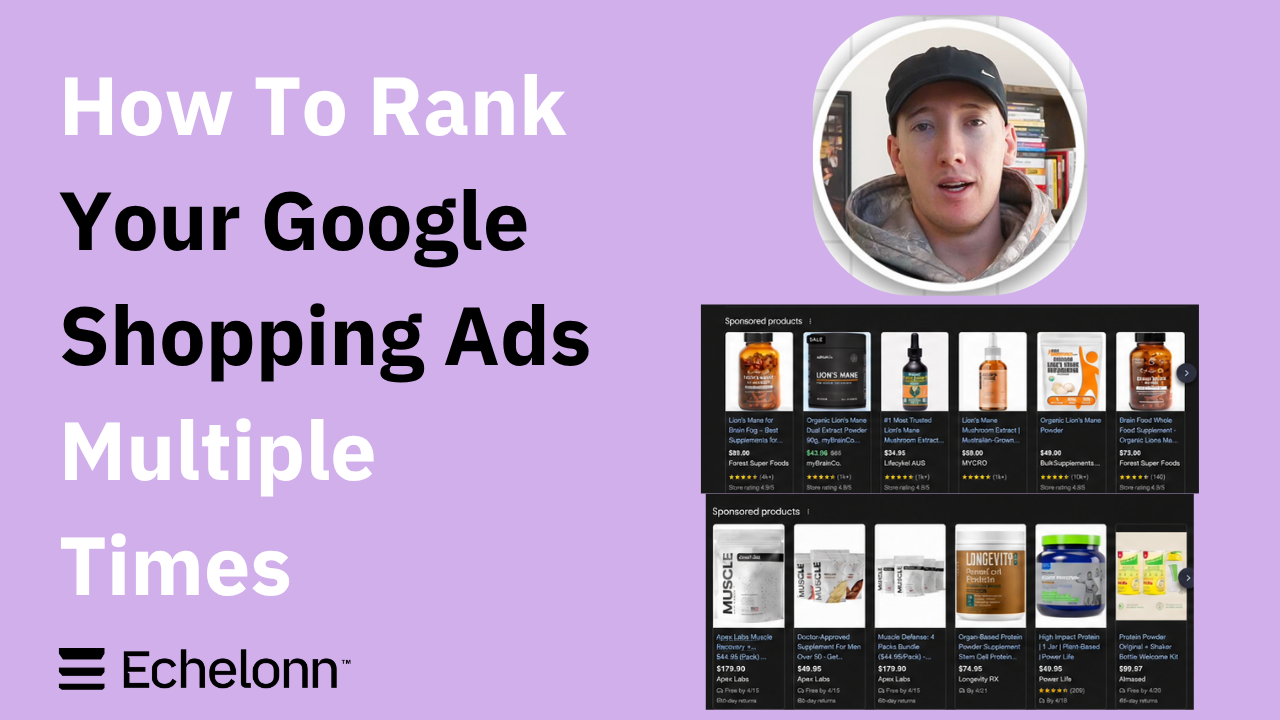
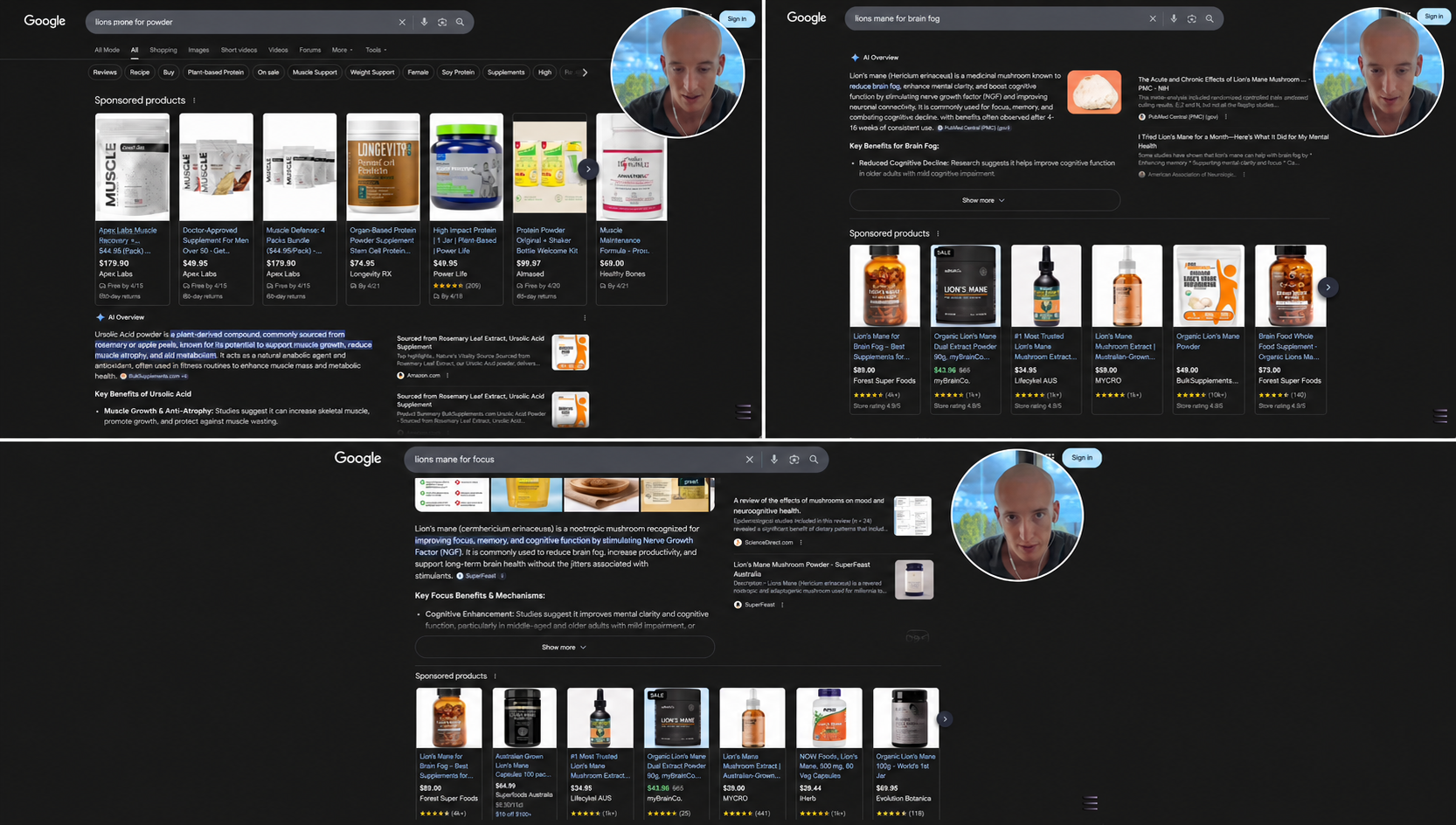
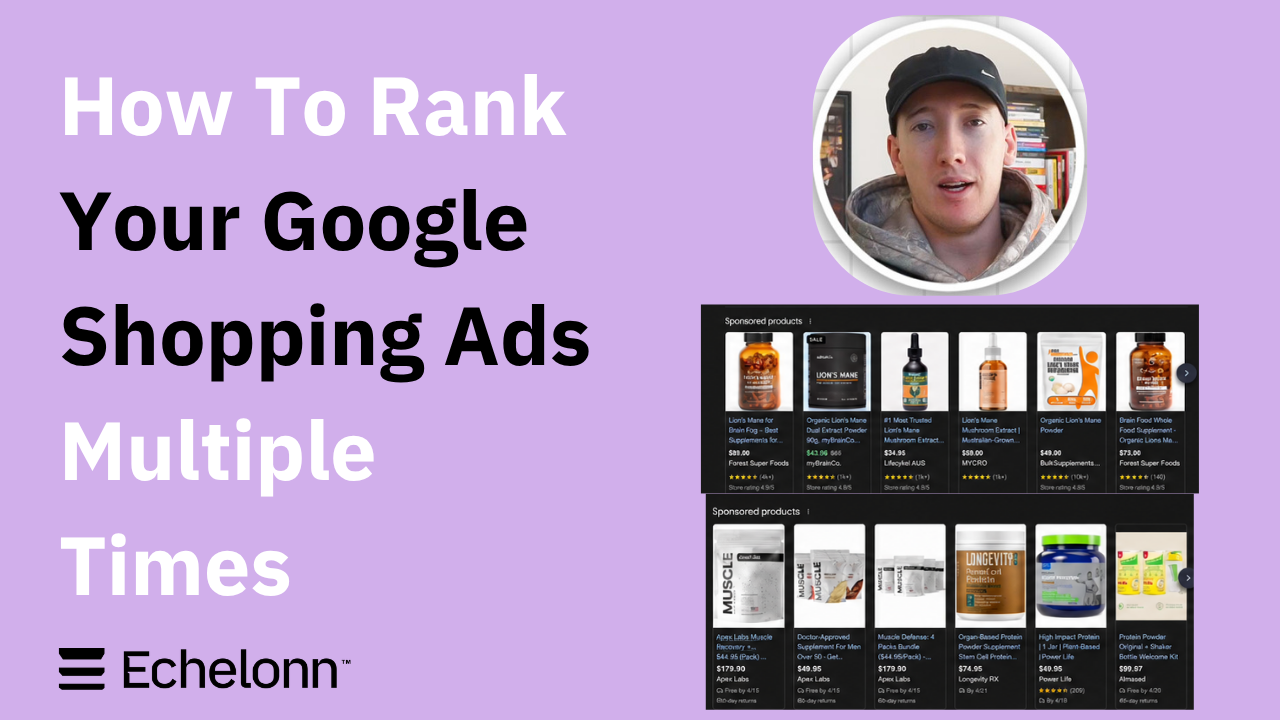
Because Google treats each entry as a separate product, you can appear in multiple positions across the Shopping carousel for different searches, or even take multiple spots on the same search. Apex Labs, for example, holds three out of six carousel positions for the same product category by running this strategy. Forest Superfoods, one of our clients, shows up for both “lion's mane for brain fog” and “lion's mane for focus" – same product, different search, different listing.
Examples of product duplication across different Google Shopping searches, with the same product appearing under different search-intent angles:
Legitimate Duplication vs. What Gets You in Trouble
There's ongoing debate in the Google Ads industry about whether this strategy is compliant. It is, but it's worth understanding exactly what separates legitimate duplication from the kind that causes problems. Google's Shopping policies prohibit retailers from trying to gain an unfair advantage in Shopping campaigns, so how you structure your duplicates matters.
Legitimate product duplication:
- Unique item ID for every variation
- Meaningfully different product title focused on a distinct query
- Unique description that speaks to a different buyer intent
- Different landing page URL that matches the angle
What creates a compliance risk:
- Near-identical listings with only minor word changes and no real content differentiation
- Using the same landing page URL across all variations
- Using a duplicate GTIN across variations, which can trigger a Google Merchant Center error
- Duplicating products purely to take up space, with no genuine relevance improvement for the user
Google's position is straightforward: if your listings add unique value to the user's experience – better relevance, better message-to-market match – they're rewarded, not penalised. A listing for “creatine for women” that speaks specifically to a female buyer and sends her to a landing page built for that audience improves the user experience. A copy-pasted listing with one swapped word does not.
How to Find the Right Keyword Angles
Start With Your Search Terms Report
Don't brainstorm angles from scratch. The data already exists in your account.
Pull the search terms report from your existing Shopping or Performance Max campaigns. Look at the last 6 to 12 months and sort by conversions. You're looking for queries that are already converting – real buyer language from people who searched, clicked, and bought. Terms like “natural sleeping tablets”, “supplements to reduce cortisol”, or “anxiety supplement” might appear there, and they're more valuable than anything a keyword planner will estimate because they come from your actual buyers. You can then use these keywords in your product titles.
Also check Google Search Console for organic data. If people are finding your product pages through informational queries, those same queries are worth testing as Shopping variations.
The 5 Keyword Angle Frameworks
Once you've reviewed your data, these five frameworks cover most of the angles worth testing:
The concern angle tends to be the most overlooked, but is often the strongest converter. Someone searching “creatine without bloating” has already decided they want to buy creatine. They're just eliminating options that don't meet their condition. If your listing addresses that objection directly in the title, you capture a click no generic listing could win.
Validating an Angle Before You Build It
Not every angle is worth building. Before investing in a new variation, check three things:
- Is there a meaningful search volume? Enough real searches to generate impressions and data?
- Is there commercial intent? Are people searching to buy, or just to research?
- Is the angle credible? Can you build a landing page around it? Do you have images to support it? Can the title address it without feeling forced?
Ideally, start with three to four variations for the first product. Once you've validated the process and you see results, scale to five to ten variations per top product. There's no reason to cap yourself once the system is proven.
Structuring Titles for Maximum Relevance
We front-load the target query into the first five words of the title because the beginning of the title carries the strongest relevance signal for Google. This isn't an official Google specification – it's a principle we apply based on how Google Shopping evaluates feed attributes for search query matching. The closer your opening words are to the search query, the stronger the relevance signal.
In practice, the title structure looks like this: [Target Query] → [Main Differentiator] → [Secondary Benefit] → [Brand]
For example, for an ashwagandha product targeting multiple use cases:
- Cortisol Supplement for Anxiety – 100% Organic Whole Root – Stress & Hormone Balance – BrandName
- Natural Sleep Supplement – Pure Whole Root Ashwagandha – Nighttime Relaxation – BrandName
- Ashwagandha for Stress Relief – Freeze-Dried Whole Root Capsules – Mental Support – BrandName
Use the language buyers actually search for, but make sure any claims in the title are accurate and comply with Google's policies for your product category.
Each title is laser-focused on one specific search. The brand goes last. The differentiators follow the query. Every variation is legitimately unique: not just rearranged words, but a distinct relevance signal built around a distinct buyer intent. Don't copy and paste the same generic title across all variations. If the titles don't differ meaningfully, neither does the relevance signal Google receives.
Descriptions, Images, and the Review Problem
Descriptions
Each variation's description should reinforce its title angle and speak directly to that buyer's specific concern, not repeat the same generic product blurb across every entry. You have up to 5,000 characters in the description field. The first 500 carry the most weight. Write as though you're talking to the person who typed that search query.
Images
Apply the same logic to images. If your titles are intent-specific but all your variations use the same generic product-on-white-background image, you're leaving a signal on the table. An image showing a woman relaxing in bed before sleep reinforces the sleep angle. A lifestyle shot of a child reinforces the kids angle. Not every variation needs a custom image, but your highest-priority angles do.
The Review Problem (and the MPN Fix)
This is one of the most common mistakes that tanks CTR when brands first run product duplication.
By default, Google treats every product variation as a unique listing. If your original product has 500 reviews and you create five duplicates, those duplicates start at zero reviews. Zero reviews next to a competitor showing 2,000 means you lose the click, regardless of how well-optimised your title is.
MPN (Manufacturer Part Number) is the unique product number assigned by the manufacturer. For product duplicates that should share reviews, keep the MPN identical across the original listing and each duplicate, while giving each variation a different item ID. This gives Google a signal that the listings represent the same underlying product and allows the reviews to be shared across them without flagging them as duplicate listings.
This is separate from item_group_id which is used to group true product variants such as different sizes or colours. For intent-based duplicates, use matching MPNs where the reviews are genuinely interchangeable rather than grouping them with item_group_id. The feed management involved might take a few hours. But the return on investment can be significant.
“Zero reviews next to a competitor showing 2,000 means you lose the click every time, regardless of how well your title or image is optimised. Make sure eligible variations are correctly grouped so they can share the appropriate review signals. The feed management takes some work, but launching duplicates without addressing review distribution can undermine their CTR from the start.”
Landing Pages That Match the Ad Angle
Your landing page needs to match the angle of your ad; not just broadly, but specifically.
We built a dedicated landing page for a supplement client who had a strong signal for PCOS-related searches. The page opened with the specific problem women with PCOS face, spoke their language throughout, and positioned the product as a direct solution. Compared to the standard product page test, the PCOS-specific landing page delivered a 28% improvement in ROAS, a 32% reduction in CPA, and a 38% improvement in conversion rate. The product is fundamentally the same, but the landing page speaks directly to the intent behind the search.
Campaign Structure: Where Your Duplicates Should Live
Dumping all your duplicates into one campaign – or worse, into the same campaign as your branded products – is one of the fastest ways to burn money. Your duplicates are optimised for non-branded, intent-based searches. They're prospecting for new customers. They belong in your non-branded campaigns, separated from branded traffic. If they end up in a branded campaign or mixed into a Performance Max campaign alongside branded signals, the data gets muddied and you can't isolate what's actually working. Even worse, your duplicates may start picking up branded search traffic at elevated CPCs – you're paying more for clicks you would have captured anyway through your branded campaign.
When you first add duplicates, put them into your existing a separate non-branded Shopping campaign. Google will test all variations and rotate impressions based on search query relevance. The best-matched variation for each query will naturally get more impressions. Keeping the duplicates in a separate campaign also makes it easier to control their budget and performance. It can also help to use cross-negatives between the duplicate campaign and your original Shopping or Performance Max campaigns. Add the new keyword angles you're targeting with duplicates as negative keywords in the original campaigns to help prevent the original listings from continuing to capture the same intent.
Sometimes the algorithm picks one variation and stops distributing impressions to the others, regardless of their relevance to different queries. If this happens, create a separate campaign for the underserved variations and give them a dedicated budget. Depending on the available budget, you can also split your duplicates across multiple Shopping campaigns from the start, with different variations in each campaign and similar budgets, so each group has a more equal opportunity to generate impressions. This can be a faster way to test multiple variations at once.
Feed Management Checklist
When you're running 5 to 10 duplicates per product across your full catalogue, small errors compound fast. A single misformatted product can trigger a chain of disapprovals in Google Merchant Center or, in serious cases, an account suspension.
Before pushing any duplicate feed live, check:
- No formatting issues in required attributes (title, description, price, availability)
- No junk or test products included in the feed
- No duplicate item IDs or incorrect product identifiers
- All landing page URLs are live, correct, and free of redirects
- MPN values are assigned correctly to the right product groups
Once live, monitor Google Merchant Center diagnostics daily for the first week. Look for item disapprovals, missing attribute warnings, and pending reviews. Issues that get caught in the first few days stay small. Left for a week or two, they cascade.
If you run sales, change prices regularly, or have fast-moving inventory, your feeds need to sync multiple times per day. Stale pricing in a duplicate feed can trigger disapprovals or display incorrect prices to buyers. For stable catalogues, daily syncs are sufficient. For anything dynamic, sync your feed two to four times per day, with the final sync scheduled a few hours before your peak traffic window.
Tracking and Optimising Performance by Variation
Once your duplicates are live, track impressions and impression share, CTR, conversion rate, and ROAS for each variation. Use the data to decide what to scale and what to fix. For winners, increase bids or budgets, but keep budget increases to a maximum of 20% per week. If CTR is low, test the title and image – the variation may not be matching the search intent strongly enough. If the conversion rate is low, look at the landing page and whether it delivers on the promise made by the ad.
If a variation still underperforms after testing, cut it rather than letting it consume budget. Keep checking the search terms report for each variation too, since more variations create more opportunities for irrelevant queries and wasted spend. Once you've validated the strategy on your top products, apply the same process to more SKUs: find the search angles, build the variations, optimise them, and scale what works.
The Bottom Line: Real Estate in Google Shopping Is Earned by Relevance
Most brands are fighting for a limited number of positions in the Shopping carousel. Product duplication changes that maths – instead of competing for a single slot with a generic listing, you can hold multiple positions on the same search or show up across different searches that competitors aren't targeting.
The strategy works because relevance drives Shopping performance. By building intent-specific variations, front-loading titles with the right queries, matching landing pages to ad angles, and getting the feed structure right, you give Google more relevant opportunities to show your products. It takes real work to set up and manage, but once it's running, it can give you a durable advantage that most competitors won't take the time to build.

Ready To Start Scaling Today?
Scaling Your Favorite eCommerce Brands To The Highest Levels Through Google & YouTube Ads.

.svg)
Get Smarter About How To Scale Your Brand...
Discover Insider Knowledge On How We Scale Brands From 7 Figures All The Way Up To 8-9 Figures With Google Ads.
.svg)
.svg)
"The best Google ads agency there is. You only need to look at the quality of clients and the reviews to understand Jackson and his team are the real deal."

"One of the best in the agency space, great service and exceptional results. Since signing on with Jackson he has become one of our greatest assets when scaling."

"Top tier team & service delivery. Jackson is relentless when it comes to fulfilment & client needs. His attention to detail during the onboarding process ensured exponential results for my coaching business. If you're looking to elevate your ad results & learn a tone of new options/skills that can be implemented to drive more sales to your business then I'd strongly recommend Echelonn."

"From the very first conversation with Jackson and his team, it was clear that we had found a Google Ads agency that prioritises results above all else. Their collaboration between data-driven experts and a skilled copywriter creates a dynamic duo for Google advertising success..."

"Been working with them for 9 months and it's been a great experience. Jackson and his team know what they are doing and always goes above and beyond. If you're looking for a reliable Google ads agency this is the one."

"The best Google ads agency there is. You only need to look at the quality of clients and the reviews to understand Jackson and his team are the real deal."
"One of the best in the agency space, great service and exceptional results. Since signing on with Jackson he has become one of our greatest assets when scaling."
"Top tier team & service delivery. Jackson is relentless when it comes to fulfilment & client needs. His attention to detail during the onboarding process ensured exponential results for my coaching business. If you're looking to elevate your ad results & learn a tone of new options/skills that can be implemented to drive more sales to your business then I'd strongly recommend Echelonn."
"From the very first conversation with Jackson and his team, it was clear that we had found a Google Ads agency that prioritises results above all else. Their collaboration between data-driven experts and a skilled copywriter creates a dynamic duo for Google advertising success..."
"Been working with them for 9 months and it's been a great experience. Jackson and his team know what they are doing and always goes above and beyond. If you're looking for a reliable Google ads agency this is the one."
More Articles Like This.
Find answers to common queries about our services and how we can help you.
.svg)
Performance Max Audience Signals Explained
Google Ads Optimization Score: Should You Trust It?
What Is a Good CTR for Google Ads?
Why More Google Ads Spend Doesn't Always Mean More Revenue
How To Rank Your Google Shopping Ads Multiple Times
Why Your Google Ads Scale Breaks After $X Per Day
How to Tell if Your Google Ads Agency Is Underperforming
Why Your Performance Max Campaign Gets Clicks but No Sales
.png)
Why Your Google Ads Budget Isn't Spending (And How to Fix It)

The Right Way to Run Google Dynamic Search Ads
How to Get New Customers With Google Ads in 2026
Why Your Google Ads CPA Keeps Increasing and How to Reduce It
What Is a Good ROAS for eCommerce Businesses?
How to Set Up Google Ads Conversion Tracking the Right Way
How Much Does a Google Ads Agency Cost?
Why Your Google Ads Are Not Converting
.png)
Average CPC in Google Ads by Industry (And What It Means for Your Strategy)
Performance Max vs. Shopping Campaigns: Which One is Better?

Why Your Google Shopping Ads Get Impressions But No Clicks (Image Optimization Guide)
Why Your Google Ads Are Not Showing

YouTube Ads Targeting Framework That's Driven $10M+ for eCommerce Brands

What Professional Google Shopping Ads Management Looks Like
How Much Do Google Ads Cost in 2026?

Should Your Business Use Google Search Ads or Performance Max?

Performance Max Best Practices for Sustainable Growth
.png)
Google Shopping Ads Audience Targeting: What Actually Impacts Performance
.png)
How to Write Google Search Ads That Actually Convert
.png)
6 Google Shopping Feed Best Practices That Drive Better ROAS
%20(1).png)
How to Get Your Products Recommended by AI (ChatGPT, Google AI & More)
.png)
Common Google Ads Myths That Cost Businesses Money
.png)
7 Benefits of Google Shopping Ads for Your eCommerce Business
.png)
How to Switch Google Ads Agency Without Losing Performance or Data
.png)
Demand Capture vs Demand Generation: Where Google Ads Fits
.png)
How to Prepare Your Business for Working With a Google Ads Agency

How to Avoid Wasting Budget on the Wrong Searches With Google Ads Keyword Match Types
Google Ads Account Ownership: What Businesses Should Know Before Hiring an Agency
.png)
Landing Page Optimization Strategies That Increase Conversions
SEO and Google Ads: How Search Engine Optimization and Paid Search Work Together
Types of Remarketing in Google Ads: How Each One Works and When to Use It
Google Ads Keyword Research: How to Find Keywords That Actually Convert
.png)
What Is Google Performance Max and How Does It Work?
.png)
How Advertorials Support High-Intent Google Ads Funnels
%20(Canva%20Template).png)
How Audience Targeting Works in Google Search Ads (and When to Use It)

Google Ads for New Brands: What to Know Before Spending Your First Dollar
.png)
What Is a PPC Agency – and When It Makes Sense to Hire One
.png)
How to Improve Your Google Ads Conversion Rate

.png)
The Right Way to Link Shopify and Google Ads for Scalable Growth
Google Shopping Campaigns Setup Guide 2025
Confessions of a Google Ads Auditor: The Worst Mistakes We See Inside eCom Accounts
How to Spy on Competitor Google Ads: Complete 2025 Guide
%20(2).png)
7 Questions to Ask Before Hiring a Google Ads Consultant
How to Rank #1 on Google Ads: Complete Shopping & Search Guide 2025
.png)
Learning Google Ads in 2025: The Roadmap Nobody Talks About
%20(1).png)
What Makes a Google Ads Specialist Worth $10,000/Month?

Why Cheap Google Ads Consulting Costs You $180,000+ in Lost Revenue
.png)
Why 99% of Google Ads Experts Fail (& How to Find One That Won’t)
.png)
5 Google Product Feed Fixes for eCom Growth
.png)
Google Ads Campaign Structure: Why 95% of Brands Waste Budget on Mixed Traffic

In-House vs Agency Google Ads: Which Delivers Better ROI in 2025?
.png)
How to Scale Google Ads With a Small Budget | Setup and Optimization

Google Shopping Optimization: 11 Proven Tactics for Maximum ROAS
%20(3).png)
eCom Growth Strategy: How We Scaled a Supplement Brand From $1.9M to $8.6M With Google Ads
%20(4).png)
Google Merchant Center Fix: How to Improve Rankings With Accurate Shipping Times

CTR Is Misunderstood by 95% of the PPC Industry (What to Optimise for Instead)
.png)
Google Ads AI | Manual vs Automated Campaign Performance

Complete YouTube Ads Guide 2025 | 3 Formats, 5 Principles, Proven Results
%20(2).png)
eCom Growth Strategy With Google Ads in 2025
.png)
Google Marketing Live 2025: 11 Key Takeaways for Marketers
%20(1).png)
YouTube Advertising Strategy: How to Drive Results Across Every Format
Google Shopping Feed Optimisation: Tips for Better Results

How Long Does it Take for Google Ads to Work?

YouTube Ads Analytics 101: Key Metrics and How to Use Them

Search Ad Strategies to Maximize Sales with Google ads for eCommerce (2024)

2025 Google Shopping Ads: Ultimate Guide, Benchmarks, and Pricing Breakdown

Maximizing ROI with Advanced Google Shopping Bid Strategies and Automated Bidding