
.svg)
Why Your Google Ads CPA Keeps Increasing and How to Reduce It


A rising CPA rarely happens without a reason. It's usually the result of a change in your account, your website, or the auctions you're competing in. The problem is that most advertisers respond by lowering bids before they've worked out what's actually changed.
Reducing CPA starts with identifying which of those three changed, not with cutting bids across the board. Below are the most common reasons Google Ads CPA increases, how to work out which one applies to your account, and the specific fixes that bring cost per acquisition back down.
Why Your Google Ads CPA Keeps Increasing
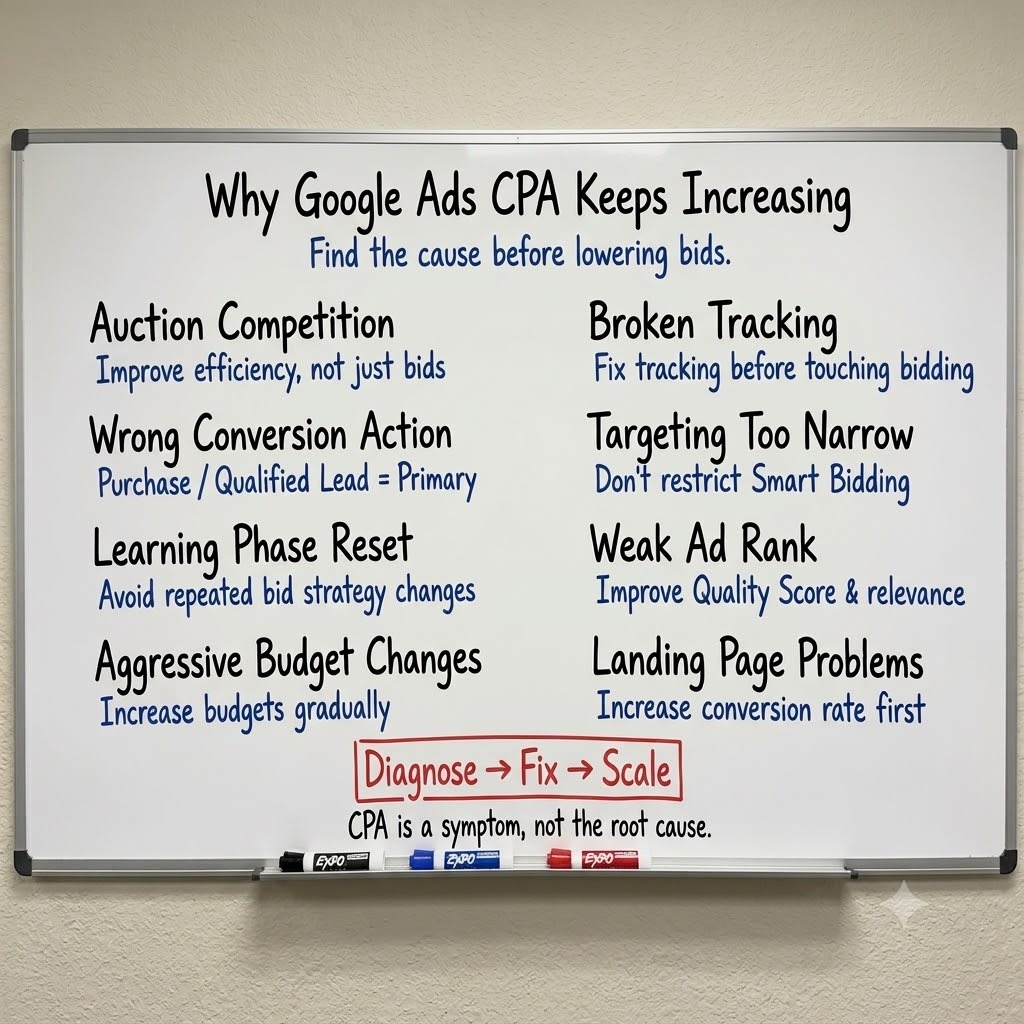
CPA rarely increases for one reason. Here are the most common causes, and how to recognise each one.
More Advertisers Are Bidding for the Same Auctions
As more advertisers compete for the same queries, the auction gets busier and CPCs rise, most visibly on high-intent, transactional keywords – a pattern that shows up constantly in eCom accounts. That alone doesn't have to move CPA, but most Smart Bidding strategies respond to higher CPCs by pushing bids further to protect volume, which drags CPA up with it. This is the hardest cause to fix, because nothing is actually wrong in your account. It's the market. The only real lever here is efficiency everywhere else, since you're not going to out-compete a crowded auction on bid alone.
Your Campaign Is Optimising for the Wrong Conversion
CPA only means something if Google is bidding towards the action you actually care about. This is where the "Cost / conv." column inside Google Ads gets misread. It shows cost per conversion action, not cost per acquisition, and the two are only the same number if the tracked action is the one that actually makes you money. If your primary conversion action is a newsletter sign-up or an add-to-cart, that column can look perfectly healthy even as your real CPA – your cost per purchase – keeps increasing.
This is a conversion action priority problem, not a bidding problem, and it's one of the most overlooked reasons CPA looks broken when the account is doing exactly what it was told to do. Purchase, or Qualified Lead for lead gen, should be the primary action feeding your bid strategy, with everything else set as secondary or observation-only. Also make sure Purchase (or Qualified Lead) is selected as the account-default conversion goal, otherwise Smart Bidding may optimise towards lower-value actions instead of the conversions that actually drive revenue.
Your Account Reset Its Learning Phase
Every time you change bid strategy, adjust a tCPA or tROAS target, or make a significant edit, Smart Bidding re-enters a learning phase. During that window the algorithm is testing auctions again, and both delivery and CPA usually get worse before they stabilise. Reacting to that instability with more changes is what turns a few volatile days into weeks of inflated CPA. It becomes a vicious cycle, and it shows up most often in accounts with lower monthly conversion volume, where the system needs longer to relearn what a good conversion looks like.
Budgets or Targets Were Changed Too Aggressively
We've seen what this looks like in the worst case. In one account, an uncoordinated change dropped tROAS targets and pushed spend up 60% overnight. The account had just closed its best month on record, sitting under $10 CPA. Within days, CPA was up 64% and new customer ROAS had halved. Nothing about the market had changed. The account was still generating conversions. It was simply paying much more for them. The targets that had been refined over months to control spend distribution were simply removed, and the algorithm did exactly what it was designed to do: spend more in search of additional conversions, even if they came at a much higher cost.
Conversion Tracking Is Feeding Google Bad Data
Smart Bidding can only optimise towards what it can see. If a purchase tag fires inconsistently, if conversions are duplicated, or if conversion values are missing, Google is bidding against distorted signals. In practice, this often looks like a campaign that's technically "working": clicks are steady, the campaign is spending as expected, yet the true cost per purchase is higher than the platform reports. Over time, this doesn't just inflate your CPA – it can also increase your overall Google Ads cost, because the algorithm keeps bidding more aggressively based on inaccurate conversion data.
It's also one of the few causes on this list you can rule in or out within an hour. Before changing bids or budgets, audit your conversion tracking and compare Purchase data against Shopify, GA4 or your CRM instead of relying on Google Ads alone.
Your Targeting Is Too Narrow for the Algorithm to Find Efficient Conversions
Location settings, match types, ad schedules, and audience exclusions can each look reasonable on their own, yet combine to create a target audience that's too small for the algorithm to find efficient conversions. This is especially common in Performance Max campaigns for eCommerce brands, where stacking too many audience exclusions quietly starves the algorithm of the volume it needs to learn. With fewer eligible users to optimise against, it ends up paying more to generate the same conversions.
Weak Ad Rank Is Forcing You to Pay More Per Conversion
Ad Rank is built from your bid, expected CTR, ad relevance, and landing page experience. A competitor with a more relevant ad or a faster, better-matched landing page can outrank you while paying less per click, which pushes your CPA up even if nothing else in your account has changed. Raising bids to compensate treats the symptom. The actual fix is almost always tighter keyword-to-ad-to-landing-page alignment.
Your Landing Page or Checkout Is Reducing Your Conversion Rate
CPA is CPC divided by conversion rate, so a CPC that hasn't moved can still produce a rising CPA if the page it sends traffic to converts worse than it used to. A slow page, a broken form, a new app adding friction at checkout, or messaging that no longer matches the ad above it will all do this without ever triggering a warning inside Google Ads. Checkout friction routinely blocks the majority of potential revenue in accounts where ad-side metrics look healthy, because the problem is invisible from inside Google Ads.
How to Diagnose What's Actually Driving Your CPA Up
Before changing anything, work out what the issue is. Since CPA is CPC divided by conversion rate, every cause above shows up as movement in one of those numbers. Pull them side by side over the same period, and the likely cause narrows fast.
Before drawing conclusions, check the account's change history for the date CPA started moving. A spike that lines up with a bid strategy change or a budget jump points straight to a learning-phase reset or an unconstrained target, not a market shift. If nothing changed on your end, Auction Insights will tell you whether competitors are simply outbidding you for the same impressions.
“Never try to reduce CPA until you know whether the increase came from CPC, conversion rate, or a change inside the account. Those three scenarios require completely different fixes.”
How to Reduce Your Google Ads CPA
Fix Tracking Before You Touch Bidding
If tracking is broken, every other change you make is aimed at the wrong target. Confirm Purchase, or Lead, is set as the primary conversion action, run a live test conversion through Tag Assistant, and check for duplicate tags before adjusting a single bid. A backup tag for the same conversion action is worth keeping permanently, since a silent tracking failure is far more expensive to detect late than to prevent.
Improve Quality Score to Lower Cost Per Conversion
Better ad relevance and a faster, more closely matched landing page lower what you pay for the same click, which lowers CPA without touching your target at all. Unlike raising bids, improving Quality Score helps you win better positions without simply paying more for every click.
Tighten Search Terms Without Starving the Algorithm
Review your search terms report regularly and exclude queries that are clearly irrelevant or unlikely to convert. That's one of the easiest ways to reduce wasted spend and improve CPA over time.
The mistake is taking it too far. Too many negative keywords or overly restrictive targeting can limit Google's ability to find new converting searches, especially in lower-volume accounts. Remove wasted traffic, but leave enough room for the algorithm to discover new opportunities.
Separate Branded From Non-Branded Campaigns
Branded traffic converts easily and rarely needs Smart Bidding to find it. Running it on Manual CPC or Target Impression Share, with low bids, keeps CPA on branded terms low instead of letting an automated strategy overpay for clicks that were converting anyway.
Rebuild tCPA/tROAS Targets From Real Data
A target set from a hoped-for number rather than actual account history is a common reason CPA looks unstable. New accounts should progress through conversion volume thresholds before tightening targets. Setting a tCPA below what the account has actually proven it can hit doesn't create efficiency. It just restricts volume until the campaign struggles to enter enough auctions to generate consistent conversions.
Scale Budgets Gradually
The fastest way to inflate CPA overnight is a large, sudden budget increase. Keep increases to around 20% every three to five days so the algorithm can use the extra spend without re-entering a full learning phase. If CPA has already spiked from an uncontrolled change, applying a bid strategy exclusion to the affected date range helps prevent Smart Bidding from learning from distorted data.
“A higher CPA isn't automatically a problem. If it's driven by stronger customer quality, higher average order value or better lifetime value, it can be the right trade-off. Before trying to lower CPA, check whether the business is actually making less money.”
When a Rising CPA Isn't Actually a Problem
A rising CPA next to flat or improving revenue and profit doesn’t mean that the account is broken. It's a strategic trade-off. Brands chasing growth often accept a higher CPA in exchange for more new customers and market share, while more conservative accounts hold a tighter CPA and grow more slowly. Neither is wrong. The number only means something next to what it's buying you: if a higher CPA is acquiring customers with meaningfully higher lifetime value, it can be the better outcome even though the metric looks worse on a dashboard.
Final Takeaway: CPA Increases Are a Signal, Not a Malfunction
CPA moves because CPC moved, conversion rate moved, or the account was told to behave differently, and all three trace back to a specific, findable cause. Chasing the number down without diagnosing which one happened usually means fixing the wrong thing, or fixing a symptom while the actual cause keeps running underneath it. Diagnose first. Most rising CPA problems have a specific cause, and once you find it, the fix is usually much simpler than advertisers expect.

Ready To Start Scaling Today?
Scaling Your Favorite eCommerce Brands To The Highest Levels Through Google & YouTube Ads.

.svg)
Get Smarter About How To Scale Your Brand...
Discover Insider Knowledge On How We Scale Brands From 7 Figures All The Way Up To 8-9 Figures With Google Ads.
.svg)
.svg)
"The best Google ads agency there is. You only need to look at the quality of clients and the reviews to understand Jackson and his team are the real deal."

"One of the best in the agency space, great service and exceptional results. Since signing on with Jackson he has become one of our greatest assets when scaling."

"Top tier team & service delivery. Jackson is relentless when it comes to fulfilment & client needs. His attention to detail during the onboarding process ensured exponential results for my coaching business. If you're looking to elevate your ad results & learn a tone of new options/skills that can be implemented to drive more sales to your business then I'd strongly recommend Echelonn."

"From the very first conversation with Jackson and his team, it was clear that we had found a Google Ads agency that prioritises results above all else. Their collaboration between data-driven experts and a skilled copywriter creates a dynamic duo for Google advertising success..."

"Been working with them for 9 months and it's been a great experience. Jackson and his team know what they are doing and always goes above and beyond. If you're looking for a reliable Google ads agency this is the one."

"The best Google ads agency there is. You only need to look at the quality of clients and the reviews to understand Jackson and his team are the real deal."
"One of the best in the agency space, great service and exceptional results. Since signing on with Jackson he has become one of our greatest assets when scaling."
"Top tier team & service delivery. Jackson is relentless when it comes to fulfilment & client needs. His attention to detail during the onboarding process ensured exponential results for my coaching business. If you're looking to elevate your ad results & learn a tone of new options/skills that can be implemented to drive more sales to your business then I'd strongly recommend Echelonn."
"From the very first conversation with Jackson and his team, it was clear that we had found a Google Ads agency that prioritises results above all else. Their collaboration between data-driven experts and a skilled copywriter creates a dynamic duo for Google advertising success..."
"Been working with them for 9 months and it's been a great experience. Jackson and his team know what they are doing and always goes above and beyond. If you're looking for a reliable Google ads agency this is the one."
More Articles Like This.
Find answers to common queries about our services and how we can help you.
.svg)
Performance Max Audience Signals Explained
Google Ads Optimization Score: Should You Trust It?
What Is a Good CTR for Google Ads?
Why More Google Ads Spend Doesn't Always Mean More Revenue
How To Rank Your Google Shopping Ads Multiple Times
Why Your Google Ads Scale Breaks After $X Per Day
How to Tell if Your Google Ads Agency Is Underperforming
Why Your Performance Max Campaign Gets Clicks but No Sales
.png)
Why Your Google Ads Budget Isn't Spending (And How to Fix It)

The Right Way to Run Google Dynamic Search Ads
How to Get New Customers With Google Ads in 2026
Why Your Google Ads CPA Keeps Increasing and How to Reduce It
What Is a Good ROAS for eCommerce Businesses?
How to Set Up Google Ads Conversion Tracking the Right Way
How Much Does a Google Ads Agency Cost?
Why Your Google Ads Are Not Converting
.png)
Average CPC in Google Ads by Industry (And What It Means for Your Strategy)
Performance Max vs. Shopping Campaigns: Which One is Better?

Why Your Google Shopping Ads Get Impressions But No Clicks (Image Optimization Guide)
Why Your Google Ads Are Not Showing

YouTube Ads Targeting Framework That's Driven $10M+ for eCommerce Brands

What Professional Google Shopping Ads Management Looks Like
How Much Do Google Ads Cost in 2026?

Should Your Business Use Google Search Ads or Performance Max?

Performance Max Best Practices for Sustainable Growth
.png)
Google Shopping Ads Audience Targeting: What Actually Impacts Performance
.png)
How to Write Google Search Ads That Actually Convert
.png)
6 Google Shopping Feed Best Practices That Drive Better ROAS
%20(1).png)
How to Get Your Products Recommended by AI (ChatGPT, Google AI & More)
.png)
Common Google Ads Myths That Cost Businesses Money
.png)
7 Benefits of Google Shopping Ads for Your eCommerce Business
.png)
How to Switch Google Ads Agency Without Losing Performance or Data
.png)
Demand Capture vs Demand Generation: Where Google Ads Fits
.png)
How to Prepare Your Business for Working With a Google Ads Agency

How to Avoid Wasting Budget on the Wrong Searches With Google Ads Keyword Match Types
Google Ads Account Ownership: What Businesses Should Know Before Hiring an Agency
.png)
Landing Page Optimization Strategies That Increase Conversions
SEO and Google Ads: How Search Engine Optimization and Paid Search Work Together
Types of Remarketing in Google Ads: How Each One Works and When to Use It
Google Ads Keyword Research: How to Find Keywords That Actually Convert
.png)
What Is Google Performance Max and How Does It Work?
.png)
How Advertorials Support High-Intent Google Ads Funnels
%20(Canva%20Template).png)
How Audience Targeting Works in Google Search Ads (and When to Use It)

Google Ads for New Brands: What to Know Before Spending Your First Dollar
.png)
What Is a PPC Agency – and When It Makes Sense to Hire One
.png)
How to Improve Your Google Ads Conversion Rate

.png)
The Right Way to Link Shopify and Google Ads for Scalable Growth
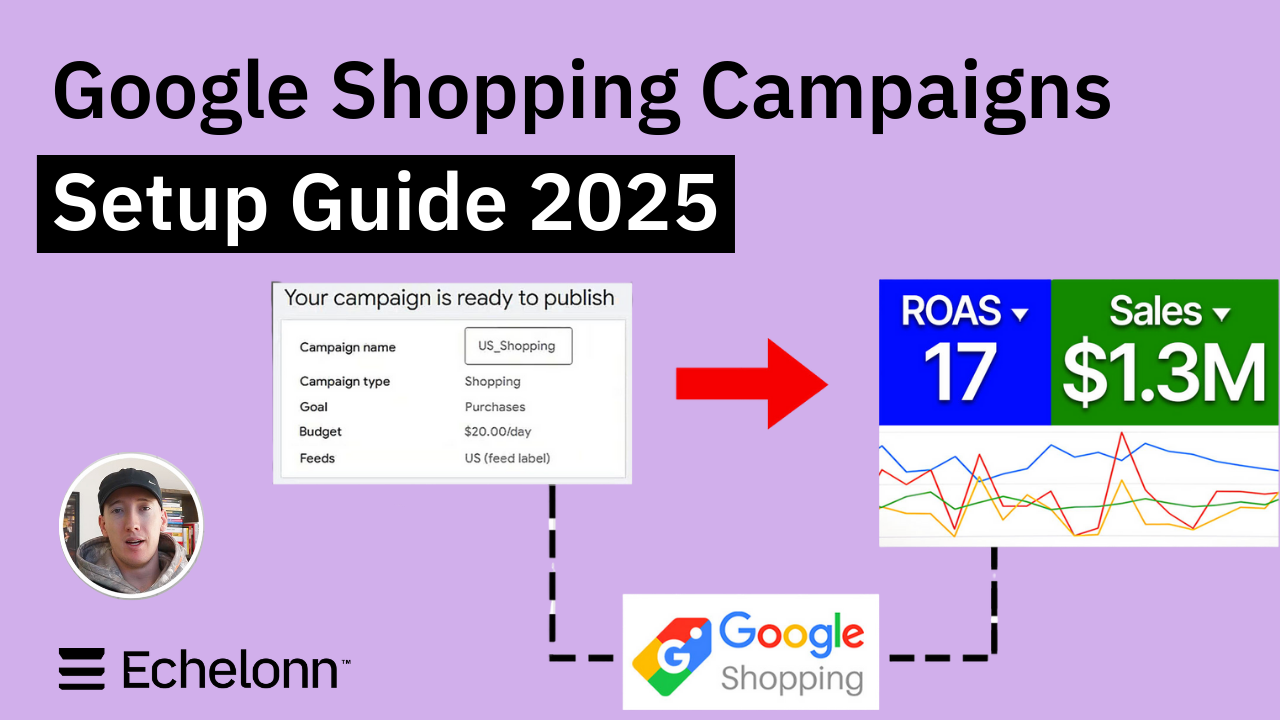
Google Shopping Campaigns Setup Guide 2025
Confessions of a Google Ads Auditor: The Worst Mistakes We See Inside eCom Accounts

How to Spy on Competitor Google Ads: Complete 2025 Guide
%20(2).png)
7 Questions to Ask Before Hiring a Google Ads Consultant
How to Rank #1 on Google Ads: Complete Shopping & Search Guide 2025
.png)
Learning Google Ads in 2025: The Roadmap Nobody Talks About
%20(1).png)
What Makes a Google Ads Specialist Worth $10,000/Month?

Why Cheap Google Ads Consulting Costs You $180,000+ in Lost Revenue
.png)
Why 99% of Google Ads Experts Fail (& How to Find One That Won’t)
.png)
5 Google Product Feed Fixes for eCom Growth
.png)
Google Ads Campaign Structure: Why 95% of Brands Waste Budget on Mixed Traffic

In-House vs Agency Google Ads: Which Delivers Better ROI in 2025?
.png)
How to Scale Google Ads With a Small Budget | Setup and Optimization

Google Shopping Optimization: 11 Proven Tactics for Maximum ROAS
%20(3).png)
eCom Growth Strategy: How We Scaled a Supplement Brand From $1.9M to $8.6M With Google Ads
%20(4).png)
Google Merchant Center Fix: How to Improve Rankings With Accurate Shipping Times

CTR Is Misunderstood by 95% of the PPC Industry (What to Optimise for Instead)
.png)
Google Ads AI | Manual vs Automated Campaign Performance

Complete YouTube Ads Guide 2025 | 3 Formats, 5 Principles, Proven Results
%20(2).png)
eCom Growth Strategy With Google Ads in 2025
.png)
Google Marketing Live 2025: 11 Key Takeaways for Marketers
%20(1).png)
YouTube Advertising Strategy: How to Drive Results Across Every Format
Google Shopping Feed Optimisation: Tips for Better Results

How Long Does it Take for Google Ads to Work?

Search Ad Strategies to Maximize Sales with Google ads for eCommerce (2024)

2025 Google Shopping Ads: Ultimate Guide, Benchmarks, and Pricing Breakdown

Maximizing ROI with Advanced Google Shopping Bid Strategies and Automated Bidding